

 Platform Overview


 Integration Hub


 Agent One™


 Agent One™ Teams


 Customer Data Management


 Personalization


 Journey Orchestration


 Reporting & Data


 Behavioral Analytics


 Web


 Email


 Site Search


 Conversational CX


 WhatsApp


 Web Push


 InStory


 App


 SMS & RCS


 Join the $0 Migration Movement™


 The Insider One Difference


 Compare Vendors


 Switch to Insider One


 Success Story


 Retail & Ecommerce


 Financial Services


 Travel & Hospitality


 Beauty & Cosmetics


 Automotive


 Telecommunications


 Total Economic Impact™ Study


 Blog


 E-Books & Guides


 Events


 Glossary
Behavior-Based SMS Messaging: How to Trigger Campaigns That Convert

Updated on 19 Nov 2026
13 mins.
Table of Contents
- Summary
- What are behavior-based SMS campaigns?
- 6 types of behavioral triggers for SMS
- How to design an SMS trigger: the five parts
- How to prioritize triggers and prevent conflicts
- Real-time or batch: how fast does trigger data need to be?
- Behavior-based SMS examples by trigger type
- Common trigger mistakes and how to avoid them
- How to set up behavior-based SMS campaigns in 7 steps
- How to measure behavior-based SMS performance
- How Insider One powers behavior-based SMS
- Conclusion
- Frequently Asked Questions
Most Popular
Summary
- Behavior-based SMS campaigns send a text when a customer does something, or stops doing something, instead of on a fixed schedule.
- Triggers fall into six types: real-time actions, inactivity, attribute or status changes, dates, external business events and predictive signals.
- Every trigger needs five parts: the event, the conditions, the timing, the exit rules and its place in a frequency and priority order.
- Fresh data, suppression rules and a clear priority order between flows matter as much as the message copy.
- Measure each trigger against a holdout group and retire the ones that don’t add incremental revenue.
A scheduled SMS blast goes to a whole list at a time the marketer chooses. Behavior-based SMS campaigns work the other way around: the customer’s action decides when a message is sent and what it says. A shopper leaves a cart, a loyal customer goes quiet, a watched product drops in price, and each of those moments starts a message built for it.
The approach pays off. In Klaviyo’s 2026 SMS benchmarks, automated flows made up 7.6% of SMS sends but produced 45.2% of SMS revenue, with roughly eight times the revenue per recipient of campaigns. This guide explains the types of behavioral triggers, how to design one, how to stop triggers from colliding, how fast the data needs to be and how to test results.
What are behavior-based SMS campaigns?
Behavior-based SMS campaigns are text messages sent automatically when a customer’s behavior meets a set of conditions. The trigger might be an action, such as adding a product to a cart, or an absence of action, such as no purchase in 60 days. The message content then reflects that behavior, such as the product left behind or the category the customer usually buys.
| Scheduled SMS campaigns | Behavior-based SMS campaigns | |
| What decides the send | A date and time chosen by the marketer | A customer action or condition |
| Audience | A segment selected in advance | Whoever meets the trigger, one by one |
| Content | One message, sometimes with merge fields | Content tied to the behavior that triggered it |
| Effort over time | New setup for every send | Set up once, runs continuously |
The two work best together. Triggered messages handle the moments when a customer is closest to buying, and scheduled campaigns cover launches, sales and seasonal moments. Insider One’s guide to SMS marketing strategy explains how to plan the two together.
6 types of behavioral triggers for SMS
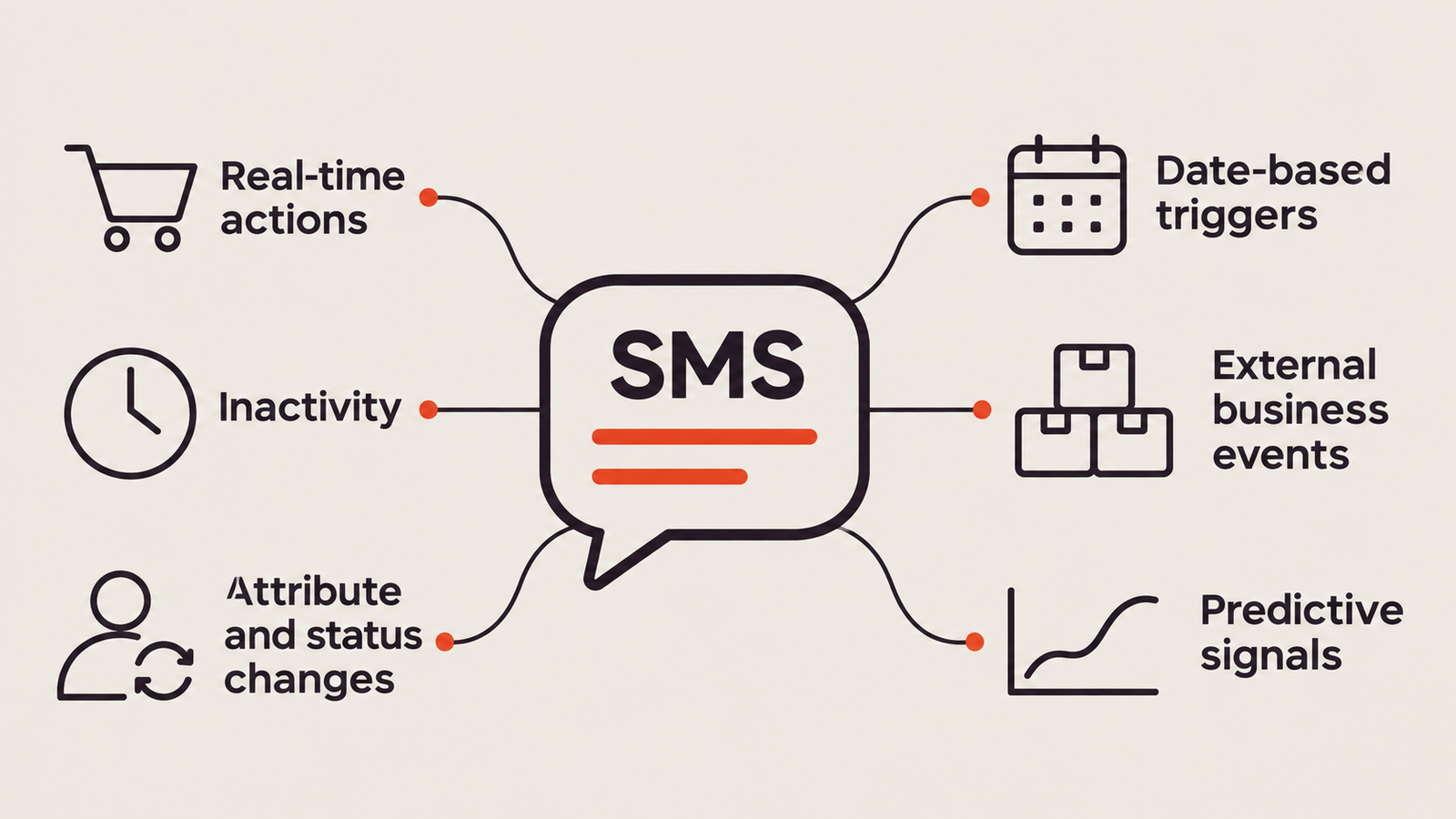
Grouping triggers by type makes it easier to spot gaps in a program and to choose the right data source for each one.
1. Real-time actions
The customer does something on the website, in the app or in a store, and the message follows within minutes. Examples include adding to cart, starting checkout, viewing a product several times, submitting a form or making a purchase. These triggers carry the strongest intent and lose value quickly, so they depend on real-time data.
2. Inactivity and absence
The trigger is something that didn’t happen: no visit in 30 days, no purchase within a customer’s usual buying interval, a subscription not renewed or a reward not redeemed. Absence triggers power win-back and retention messages. Cart abandonment is the best-known example: a shopper adds products to the cart, then leaves without buying. In Baymard Institute’s research, the documented average cart abandonment rate is 70.22%. Because these shoppers have already chosen a product, a timely reminder that takes them straight back to their cart gives the store a second chance at the sale.
3. Attribute and status changes
A value in the customer profile changes: a loyalty tier upgrade, a points balance crossing a reward threshold, an order status moving to “shipped” or a subscription moving to “payment failed.” These triggers suit service and loyalty messages that customers expect to receive.
4. Date-based triggers
The trigger is a date tied to the customer: a birthday, a membership anniversary, a booking date, a trial end date or a predicted replenishment date. Date triggers are easy to plan in advance and work well for reminders.
5. External business events
Something changes outside the customer’s own behavior but matters to them: a viewed product drops in price, an item comes back in stock, a flight is delayed or an artist they follow announces a show in their city. The trigger combines the business event with each customer’s history to decide who should hear about it.
6. Predictive signals
A model scores each customer, and a change in that score triggers the message. Common signals include likelihood to purchase, likelihood to churn, discount affinity and predicted next category. Predictive triggers help brands act before behavior becomes visible, for example by reaching a customer whose churn risk rises before they lapse completely.
How to design an SMS trigger: the five parts
A trigger that only defines the event will send too often, to the wrong people or after the moment has passed. A complete trigger has five parts:
| Part | Question it answers | Example for a browse abandonment trigger |
| Event | What behavior starts the flow? | Viewed the same product three or more times in 24 hours |
| Conditions | Who qualifies? | SMS opt-in, not purchased in the last 7 days, product in stock |
| Timing | When is the message sent? | Two hours after the last view, within local quiet hours |
| Exit rules | What stops the flow? | Adds the product to cart, purchases or opts out |
| Frequency and priority | How does it fit with other messages? | Lower priority than cart abandonment; counts toward the weekly SMS cap |
The thresholds in the example, such as three views or a two-hour delay, are starting points to test rather than benchmarks. The right values depend on the product, price and buying cycle.
How to prioritize triggers and prevent conflicts
As a program grows, one customer can qualify for several triggers on the same day. Consider a shopper who views a jacket, adds it to the cart and leaves. That evening, the jacket drops in price, and the shopper’s churn score also crosses a threshold. Without rules, the shopper could receive three texts in a few hours.
Three rules prevent this:
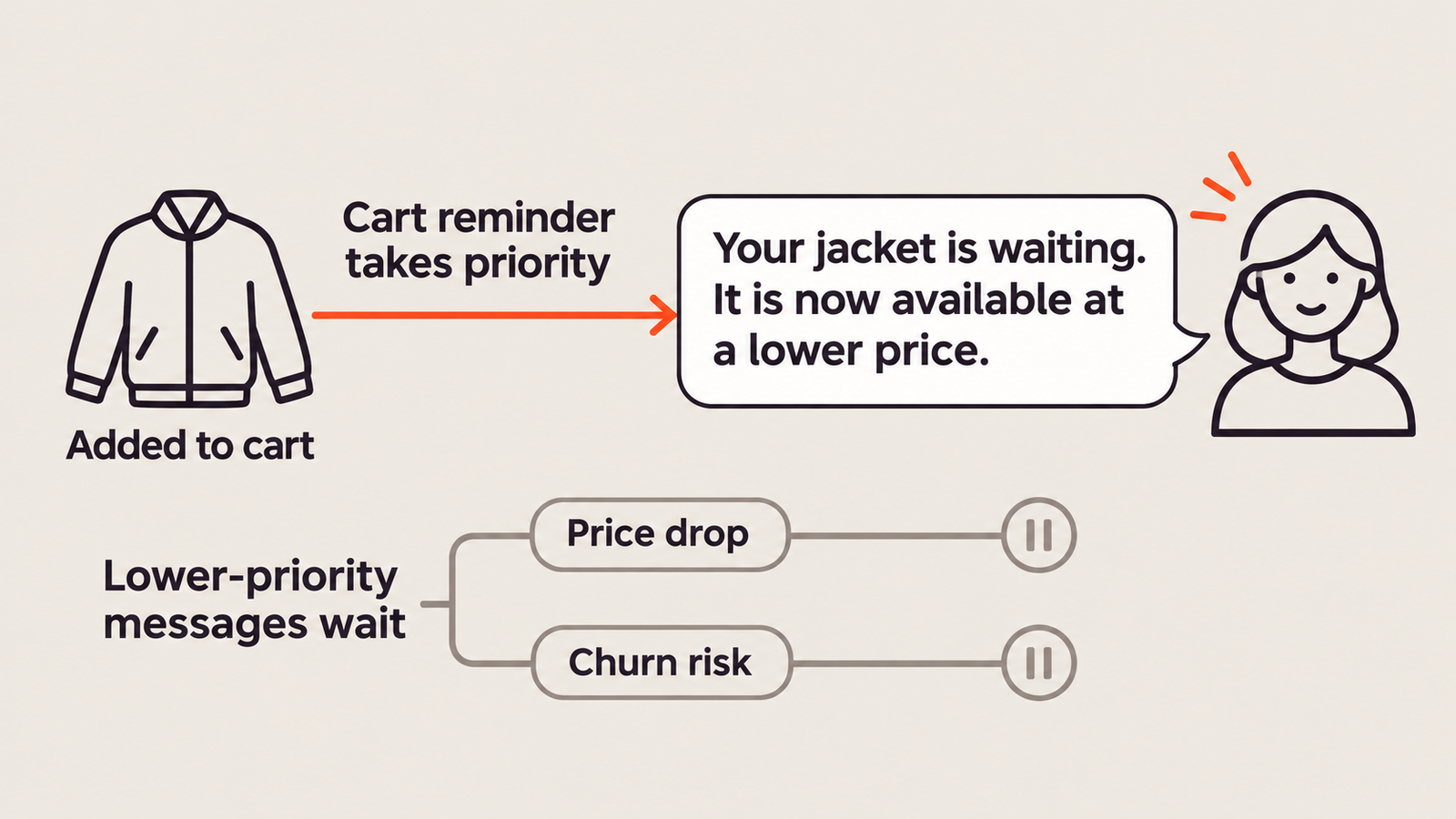
1. Rank triggers by intent and value. A practical order to start from: transactional and service messages first, then cart and checkout abandonment, then price drop and back in stock, then browse abandonment, then retention and win-back.
2. Let one trigger suppress another. If a customer is in a cart abandonment flow, pause lower-priority flows for the same product until the cart flow ends.
3. Apply a shared frequency cap. Set a daily and weekly maximum for all marketing SMS combined, so no single flow can push a customer past it.
In the jacket example, the shopper would receive one cart reminder that mentions the lower price, and the churn-risk message would wait until the following week.
Real-time or batch: how fast does trigger data need to be?
Not every trigger needs real-time data, and treating them all the same way adds cost and complexity. A practical split:
| Speed needed | Trigger examples | Why |
| Within minutes | Cart and checkout abandonment, form abandonment, purchase confirmation, back in stock for limited items | Intent fades quickly, and a late message can arrive after the customer has already bought |
| Within hours | Browse abandonment, price drop, attribute changes such as loyalty tier upgrades | Relevance holds for several hours |
| Daily | Inactivity, win-back, date-based reminders, predictive score changes | The signal itself develops over days or weeks |
Speed also matters for suppression. If purchase data reaches the messaging platform hours late, customers who already bought will still receive cart reminders. Insider One’s customer data platform (CDP) brings website, app, store and order data into one customer profile, so triggers and exit rules work from the same customer record.
Behavior-based SMS examples by trigger type
The following examples show how each trigger type turns into a message. Insider One’s guide to SMS automation strategies covers more flow ideas.
| Trigger type | Trigger | Message |
| Real-time action | Checkout started, not completed in one hour | Reminder with a link back to checkout |
| Inactivity | No purchase for 1.5 times the customer’s usual buying interval | New arrivals in the customer’s favorite category |
| Attribute change | Loyalty points cross the next reward threshold | Notice of the available reward and how to use it |
| Date-based | Predicted replenishment date for a consumable | One-tap reorder link |
| Business event | Viewed or wishlisted item back in stock | Back-in-stock alert with a product link |
| Predictive signal | Churn risk rises above a set level | Personalized reminder or service check-in before the customer lapses |
For message-level guidance, including sample copy and fallbacks for missing data, see Insider One’s SMS marketing tips.
Common trigger mistakes and how to avoid them
- Stale or delayed data: messages arrive after the customer has already acted. Check the delay between the event and the send for every real-time trigger.
- Missing exit rules: customers keep receiving reminders after purchasing in another channel or in store. Include all purchase sources in exit conditions.
- Duplicate entries: repeated events, such as refreshing a page, put the same customer into a flow twice. Set re-entry limits for each flow.
- Triggers that fire too easily: a single product view treated as strong intent floods subscribers. Raise the threshold or add conditions.
- Ignoring quiet hours: a trigger at 11 p.m. should wait until morning. In the US, federal rules limit telephone solicitations to 8 a.m. to 9 p.m. local time, and some states are stricter; Insider One’s SMS marketing rules guide covers the details.
- No end date for tests: experimental triggers stay live long after anyone reviews them. Give every new trigger a review date.
How to set up behavior-based SMS campaigns in 7 steps
1. Set a goal for each trigger, such as recovered revenue, repeat purchase or reactivation, and choose the metric that proves it.
2. Map the behaviors and data sources for the website, app, store, order system and loyalty program, and confirm how quickly each one updates.
3. Prioritize triggers by expected value and ease of setup. Cart and checkout abandonment are a good place to start, since these shoppers are closest to buying.
4. Design each trigger with its event, conditions, timing, exit rules and priority.
5. Write the messages with fallbacks for missing data and a check on length, since a single emoji reduces an SMS segment from 160 to 70 characters, according to Twilio.
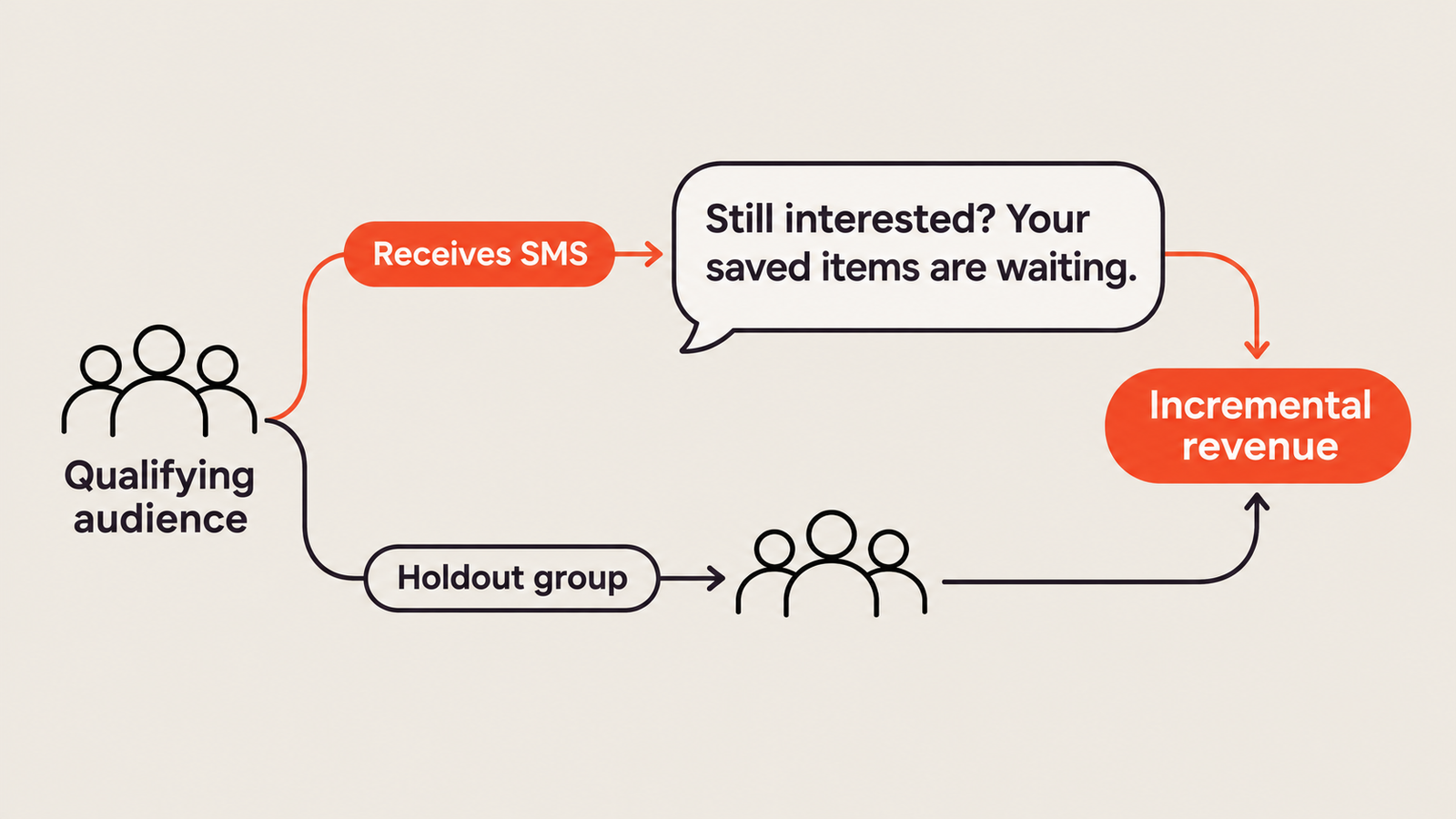
6. Launch with a holdout group that meets the trigger but receives no message.
7. Review results monthly, adjust thresholds and timing, and retire triggers that don’t show lift.
How to measure behavior-based SMS performance
Triggered messages often reach customers who were close to buying anyway, so attributed revenue can overstate their value. A holdout group solves this: compare revenue per customer between those who received the message and those who met the trigger but didn’t. The difference is the lift the trigger created. Insider One’s guide to measuring incremental lift explains the method.
For each trigger, track:
- Trigger volume, to catch triggers that fire far more or less often than expected.
- Time from event to send.
- Click-through and conversion rate.
- Incremental revenue per message, after SMS cost.
- Opt-out rate, the clearest sign of a trigger that fires too often.
How Insider One powers behavior-based SMS
Insider One’s Architect is a customer journey orchestration solution that turns each trigger type in this guide into an automated journey. Every Architect journey begins with a starter, the rule that decides who enters the journey and when. The main starters are:
- On Event: enters customers into a journey as soon as they complete an event, such as adding to cart or making a purchase, across website, app and offline data.
- User Website Action: enters website visitors into a journey within about a minute of matching the segments and rules you choose, such as viewing the cart page with items still in it.
- On Past Behavior: builds entry criteria from events, visit and purchase history, attributes, and predictive and RFM segments, for triggers such as no purchase in the last 30 days. It checks for qualifying customers on a schedule you set, as often as every hour, which suits inactivity and win-back triggers.
- On Business Event: starts a journey from an external event sent by API and matches it against customer data, for use cases such as flash sales or travel advisories.
- On Price Drop, On Back in Stock, On Attribute Change and On Dynamic Date: start a journey when a product drops in price or comes back in stock for customers who viewed it or added it to their cart or wishlist, when a profile value such as loyalty tier changes, or when a date such as a birthday arrives.
In the same journey, SMS works alongside email, app push, web push, WhatsApp and onsite messages. Channel frequency capping also applies to Architect journeys, so triggered SMS counts toward the limits you set. SMS Silent Hours stop messages from being delivered during the hours you choose, based on each recipient’s local time zone, and US senders can also apply state-level quiet-hour rules automatically.
Insider One’s SMS and RCS page and its overview of AI-powered SMS marketing explain how predictive segments and AI-powered send-time optimisation make each SMS more relevant.
With Agent One, Insider One’s self-optimizing intelligence system for customer engagement, teams can go further: they set the outcome and guardrails, and Agent One uses live customer context and campaign performance to keep improving SMS messages, audiences, timing and journeys over time.
Sports brand Slazenger used Architect and Journey Agent, the AI assistant inside Architect that builds a journey’s structure from a plain-language description, to design a cart abandonment journey across email, web push and SMS. SMS delivered the coupon codes that encouraged shoppers to complete their purchase. A single cart abandonment campaign recovered 40% of abandoned revenue, and Slazenger reported 49X ROI within eight weeks, according to the Slazenger case study.
Conclusion
Behavior-based SMS campaigns turn customer actions into well-timed messages, but the results depend on how the triggers are built. Brands that classify their triggers, define each one completely, set clear priorities, match data speed to the trigger and measure every flow against a holdout can scale triggered SMS without overwhelming subscribers.
To see how Insider One triggers SMS from real-time behavior, take the interactive platform tour or book a personalized demo.
Frequently Asked Questions
A behavior-based SMS campaign, also called a behavioural or triggered SMS campaign, is a text message sent automatically when a customer’s actions or inactivity meet set conditions, such as abandoning a cart or not purchasing for a set period.
Transactional SMS confirms something the customer requested, such as an order or a password reset. Triggered marketing SMS reacts to behavior to encourage a next step, such as completing a purchase. Marketing messages need marketing consent, even when they are triggered.
Cart and checkout abandonment are the natural first triggers for an ecommerce brand, because those shoppers are closest to buying. From there, add browse abandonment, back in stock, price drop, post-purchase and win-back triggers as data and resources allow.
It depends on the trigger. Cart and checkout reminders lose value within hours, so they need near real-time data. Inactivity and win-back triggers can run daily. Every send should also respect local quiet hours.
There is no universal number. Set a shared daily and weekly cap across all marketing SMS, and watch opt-out rates by trigger to see where volume is too high.
Some do. Triggers tied to high-intent actions, such as abandoned checkouts, need data within minutes. Triggers based on longer patterns, such as inactivity or churn risk, work with hourly or daily updates.
Compare customers who received the message with a holdout group that met the trigger but received nothing. The difference in revenue or conversion shows the incremental impact of the trigger.

Keep Reading
4 min.

Chris Baldwin
3 Feb 2026
15 mins.

Nicolas Algoedt
19 Nov 2026
10 mins.
Chris Baldwin
18 Nov 2026