

 Platform Overview

 Integration Hub

 Agent One™

 Agent One™ Teams

 Customer Data Management

 Personalization

 Journey Orchestration

 Reporting & Data

 Behavioral Analytics

 Web
Web

 Email
Email

 Site Search

 Conversational CX

 WhatsApp

 Web Push

 InStory

 App
App

 SMS & RCS

 Join the $0 Migration Movement™

 The Insider One Difference

 Compare Vendors

 Switch to Insider One

 Success Story

 Retail & Ecommerce

 Financial Services

 Travel & Hospitality

 Beauty & Cosmetics

 Automotive

 Telecommunications

 Total Economic Impact™ Study

 Blog
Blog

 E-Books & Guides

 Events

 Glossary
MCP Servers are Reshaping What Marketing AI Can Actually Do

Updated on 26 Jun 2026
10 min.
Table of Contents
- Summary
- What an MCP server actually does inside a marketing stack
- Which marketing platforms have shipped production-ready MCP servers
- Real workflows marketing teams are running with MCP today
- Where competitors fall short and what the gaps mean for your stack
- How to pilot MCP in your marketing system without breaking what works
- FAQs
Most Popular
Summary
MCP lets AI agents securely access live marketing data through a standard interface, reducing custom integrations. Today, it’s mainly used for read-only analytics, while write access requires strong governance and approval controls.
A campaign is underperforming and nobody on your team knows yet. The data exists across your customer data platform (CDP), your ad platforms, your email tool, and your customer relationship management (CRM) system, but pulling it together requires an analyst, three exports, and half a day.
That lag is the real cost of fragmented marketing infrastructure, and it is the problem MCP servers are built to address.
Model Context Protocol (MCP) is a standardized, open protocol that lets artificial intelligence (AI) agents connect to external tools and data sources through a consistent interface.
Instead of your engineering team building and maintaining a separate integration for every tool in your stack, MCP gives an AI model a predictable way to ask a marketing system what it knows, request live data, and execute actions, all in response to a plain-language prompt from a marketer.
It is early infrastructure, but it is moving quickly, and the decisions you make about it this year will shape how much your AI investments can actually deliver.
What an MCP server actually does inside a marketing stack
The client-server model in plain terms
Think of MCP as a universal socket standard for AI. The AI model is the client. Your marketing tools, your CRM, your email platform, your CDP, your ad accounts, are the servers. MCP is the protocol that governs how they exchange context and instructions.
When a marketer asks an AI assistant to “show me which audience segments have dropped engagement this week,” the AI does not guess. It uses MCP to query the relevant server, retrieve live data, and surface a real answer drawn from current records.
What makes this different from the integrations your team already manages is the dynamic, multi-step nature of what an AI agent can do across that connection.
A traditional API is a static point-to-point connector: one system calls another, the second returns a fixed payload, and that is the full extent of the exchange. MCP changes the shape of that interaction considerably.
An AI agent using MCP can discover what operations a server supports, choose the right one for the task at hand, chain several operations together, and take an action, such as pausing an underperforming campaign or updating a segment definition, all within a single goal-oriented prompt.
That shift from passive data retrieval to active, multi-step operation is what makes MCP a meaningful infrastructure change rather than just another integration format.
Which marketing platforms have shipped production-ready MCP servers
The live ecosystem as of 2026
The MCP ecosystem for marketing has expanded considerably in 2026.
Several major enterprise marketing vendors, including Adobe’s enterprise marketing suite and Salesforce’s marketing and CRM platform, have moved to add MCP support, exposing operations across campaign management, CRM records, and analytics objects.
Other platforms in the email, customer engagement, and CDP categories have followed similar directions, though the scope and configuration experience varies significantly across vendors.
The channel side of the market is moving in parallel. Platforms oriented toward email, mobile, and customer lifecycle marketing have begun exposing MCP endpoints for analytics queries and, in some configurations, campaign-level modifications.
Based on publicly available direction as of early 2026, MCP compatibility is becoming a table-stakes feature for enterprise marketing platforms rather than a differentiator held by a handful of vendors.
Read-only vs. read-write: why the distinction matters
Not all MCP servers operate with the same risk profile, and that distinction deserves explicit attention before you connect anything to a production environment.
Read-only servers expose data for retrieval: analytics dashboards, segment sizes, performance metrics, and lead records. They carry minimal operational risk because the AI can observe but not act on what it finds.
Read-write servers go further, allowing an agent to pause a campaign, update a CRM record, trigger a journey, or modify a segment definition. The capability is genuinely useful, but a misconfigured permission or an ambiguous prompt can have real downstream consequences in live campaigns.
Most enterprise implementations start read-only across one or two tools, validate the accuracy of what the AI retrieves, and only then extend write permissions with appropriate governance controls in place.
Real workflows marketing teams are running with MCP today
Cross-channel reporting without the export queue
The most immediate, low-risk application of MCP in a marketing stack is unified performance reporting. If multiple ad accounts both have MCP servers connected to the same AI client, a marketer can ask a single question, such as “compare cost-per-qualified-lead across both platforms for the current month,” and receive a live answer drawn from both sources simultaneously.
No CSV exports, no waiting for a business intelligence dashboard to refresh, and no analyst in the loop for a routine data pull. For marketing automation workflows that depend on fresh performance data to make budget decisions mid-flight, this kind of real-time access compresses decision cycles in a way that scheduled reports simply cannot match.
Agentic campaign operations
The more ambitious application is agentic operation: an AI agent that does not just retrieve data but acts on it. Consider a lead scoring workflow where a contact crosses a threshold, which triggers an agent to pull their CRM history, recent content downloads, and intent signals through MCP connections to three separate systems.
The agent then drafts a personalized follow-up email, flags a recommended journey branch in your journey orchestration tool, and surfaces both to a human reviewer for approval before anything goes live.
That sequence, which previously required a representative to manually cross-reference three tools and write the message from scratch, can complete in seconds. The human still makes the final call, but the preparation work is done.
This is where agentic AI in marketing moves from concept to operational advantage, and it depends entirely on MCP connections being in place across the relevant systems.
Note: This workflow describes what is possible with read-write MCP configurations across enterprise marketing stacks. Insider One’s MCP Server is scoped to read-only analytics. Agentic execution, journey creation, campaign triggering, and content generation are handled through Insider One AI and Agent One™ natively within the Insider One platform.
Where competitors fall short and what the gaps mean for your stack
The developer dependency problem
Adobe’s enterprise marketing suite and Salesforce’s marketing and CRM platform are both moving toward MCP capability, and the breadth of operations each exposes is substantial.
The practical limitation, based on publicly available documentation as of early 2026, is not the feature set but the configuration path. Both implementations appear to be architected primarily for enterprise developers rather than marketing operators.
Defining which tools are exposed, setting permission scopes, connecting to the right data objects, and validating that the AI client interprets responses correctly all tend to require engineering involvement.
For a marketing operations manager who wants to connect a reporting workflow to an AI assistant without opening a ticket, that dependency is a real barrier.
The usability gap between “MCP-capable” and “MCP-usable by a non-developer marketer” is where the current generation of enterprise implementations leaves many teams stranded.
The single-platform ceiling
Several channel platforms have functional MCP servers, and within their respective scopes they work well. The constraint is scope itself.
A server scoped to one email or engagement platform gives an AI agent visibility into that platform’s data: email metrics, audience segments, and flow performance.
It does not give the agent a view across your full stack, and in our assessment, it cannot orchestrate an action that spans multiple platforms in a single prompt.
For teams running a fragmented martech environment, which describes the operational reality at many mid-market and enterprise brands, orchestrating across a CRM, a CDP, ad platforms, email, and analytics still requires either a custom orchestration layer built by an engineering team or a platform that exposes a unified marketing MCP endpoint natively.
Where Insider One fits in this picture
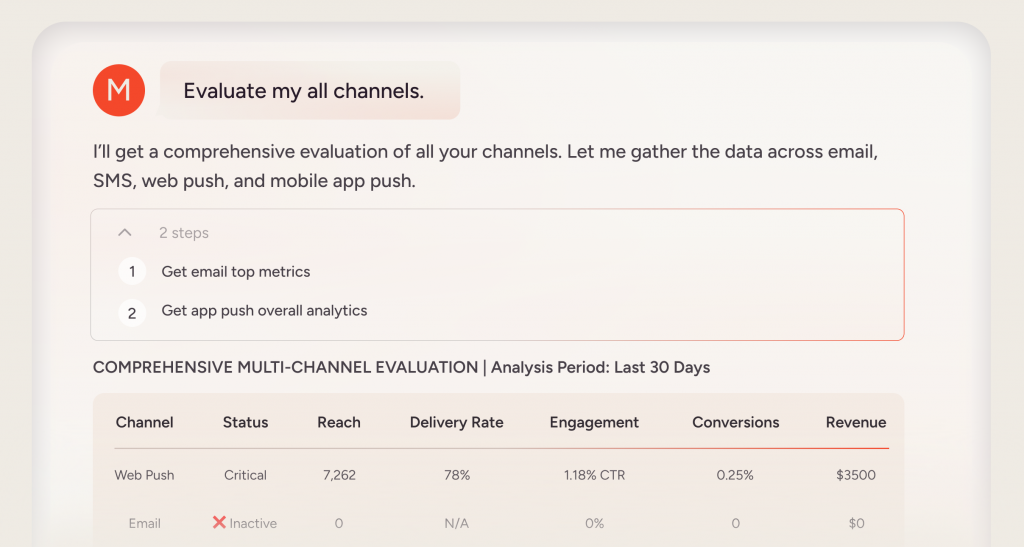
That unified layer is the gap the market has not yet closed. Insider One’s MCP Server is purpose-built for the analytics side of this problem, providing a read-only, governed interface that lets AI clients query live campaign performance, channel metrics, and engagement data in natural language, without requiring data exports or dashboard navigation.
Campaigns cannot be launched, configurations changed, or customer records modified through MCP; this is by design, ensuring AI access to insight without operational risk.
For teams that need cross-channel orchestration and AI-driven execution, that happens through Insider One AI and Agent One™ natively within the platform itself.
As one example of what connected AI enables in practice, Adidas achieved a significant uplift in average order value and conversion rate using Insider One’s personalization and automation capabilities, the kind of cross-channel outcome that depends on unified data, not siloed per-tool metrics.
As one example of what cross-channel, data-connected AI enables in practice, Adidas achieved a significant uplift in average order value and conversion rate using Insider One’s connected personalization and automation capabilities, the kind of cross-channel outcome that depends on an AI layer with access to unified data, not siloed per-tool metrics.
How to pilot MCP in your marketing system without breaking what works
Start narrow and read-only
The right first move is picking one high-value, bounded use case and wiring it up before expanding.
Weekly performance reporting is the most common entry point: connect a single MCP server, your ad account or your email platform, to an MCP-compatible AI client and spend two to four weeks measuring how much time the reporting workflow saves and how accurately the AI interprets live data.
If the answers are reliable and the time savings are real, you have a validated foundation to build from.
Jumping immediately to multi-platform, read-write configurations before that foundation is established is where early pilots tend to generate noise rather than results. For teams exploring data-driven marketing automation more broadly, MCP is most valuable when it amplifies workflows that already have clear data inputs and measurable outputs.
Set governance guardrails before going agentic
Connecting an AI agent to live marketing systems without governance controls in place is the operational equivalent of giving a new hire unrestricted admin access on day one. The tooling exists to do this responsibly.
OAuth-based authentication and role-based permissions let you define precisely which data fields and operations an AI agent can access, keeping the impact manageable if something behaves unexpectedly.
Every agent query should be logged for audit purposes, not because errors are expected, but because traceable decisions are the baseline requirement for compliance and for diagnosing problems when they occur.
Before any MCP server is granted read-write access to live campaign data or customer records, a human-in-the-loop approval step should be in the workflow. Agentic automation is most useful when it accelerates human judgment rather than bypassing it.
These guardrails are especially important as teams move toward the kind of omnichannel marketing automation that touches multiple systems and customer touchpoints simultaneously.
If you want to see how Insider One AI turns live customer data into coordinated, revenue-driving experiences, book a personalized demo to see the exact use cases, decision logic, and growth levers most relevant to your team.
FAQs
It depends on the platform and the MCP server’s configuration interface. Some servers, particularly those from enterprise vendors, currently require engineering involvement to configure permissions and connect to the right data objects. Insider One MCP offers two paths. Claude Desktop users can connect through a built-in Connectors interface, no configuration files or terminal commands required.
For other MCP-compatible clients such as Cursor, setup requires Node.js and editing a local configuration file, which typically needs a technically proficient marketing ops team member or developer. Administrator-level Insider One permissions are required to generate API credentials for either path. Before committing to any platform’s MCP implementation, confirm whether your preferred AI client supports the simpler OAuth flow or requires manual configuration.
A standard API is a static connector: one system calls a fixed endpoint, the other returns a fixed payload. An MCP server is dynamic. An AI agent can query the server to discover what operations are available, choose the appropriate one for a given task, chain multiple operations together, and take actions, all based on natural-language instructions. The practical difference is that APIs require predefined workflows, while MCP lets an AI agent construct workflows on the fly based on a goal.
MCP itself is a protocol, not a security model. Safety depends entirely on implementation. Read-only configurations carry minimal operational risk. Read-write configurations require proper OAuth authentication, role-based access controls, audit logging, and human-approval checkpoints before the AI can modify live records or campaign settings. Treat MCP permissions the same way you treat admin access: grant the minimum necessary scope, log everything, and expand gradually as reliability is confirmed.
Compatibility is expanding quickly across the AI assistant landscape, with several major AI platforms having added or actively adding MCP support. That said, support levels and feature coverage vary by vendor and update cycle. It is worth confirming your chosen AI client’s MCP support status before building a workflow dependency on it, particularly for read-write operations.

Keep Reading
4 min.

Chris Baldwin
3 Feb 2026
9 min.
Chris Baldwin
2 Nov 2026
9 min.
Chris Baldwin
2 Nov 2026