

 Platform Overview

 Integration Hub

 Agent One™

 Agent One Teams™

 Customer Data Management

 Personalization

 Journey Orchestration

 Reporting & Data

 Behavioral Analytics

 Web
Web

 Email
Email

 Site Search

 Conversational CX

 WhatsApp

 Web Push

 InStory

 App
App

 SMS & RCS

 Join the $0 Migration Movement™

 The Insider One Difference

 Compare Vendors

 Switch to Insider One

 Success Story

 Retail & Ecommerce

 Financial Services

 Travel & Hospitality

 Beauty & Cosmetics

 Automotive

 Telecommunications

 Total Economic Impact™ Study

 Blog
Blog

 E-Books & Guides

 Glossary
What To Look for in the Best SMS Automation Tools for E-commerce

Updated on 19 Jun 2026
9 min.
Table of Contents
- Summary
- What should you look for in SMS automation tools for ecommerce?
- Which SMS automation platforms fit each use case?
- How do you implement ecommerce SMS automation the right way?
- What should ecommerce brands know about SMS costs, carrier fees, and 10DLC?
- How does Insider One power ecommerce SMS automation?
- Frequently asked questions
Most Popular
Summary
The best ecommerce SMS automation tools use real-time store data to trigger personalized messages, manage compliance, and optimize customer journeys. Shopify-focused brands benefit from native integrations, omnichannel teams need unified email/SMS orchestration, and enterprise brands require scalable infrastructure like short codes, SLAs, and 10DLC support.
Most ecommerce brands treat SMS automation tools for ecommerce as a basic requirement. They launch abandoned cart flows without understanding how event latency, suppression logic, or inventory sync actually determines whether recovery rates are modest or exceptional.
Message copy matters, but platform connections to checkout events, quiet hours by timezone, and cross-channel suppression have a major impact on results.
What should you look for in SMS automation tools for ecommerce?
Most SMS tools claim to support abandoned cart recovery. What separates weak recovery rates from strong ones comes down to how the tool handles event latency, suppression logic, and personalization depth. A platform built for retail workflows will outperform one designed for general marketing broadcasts.
Red flags that signal a tool isn’t built for ecommerce:
- No native integration with Shopify, BigCommerce, or your commerce platform
- Batch-only data syncing that delays time-sensitive triggers
- Missing quiet hours enforcement for local time zones
- No suppression rules for recent purchasers
What personalization capabilities matter most?
Basic merge tags aren’t enough anymore. Ecommerce-grade personalization requires inventory-aware messaging so you never promote out-of-stock items. It also relies on SKU-level recommendations and predictive scores like likelihood to purchase.
Compare these two approaches:
- Basic: “Hey {{first_name}}, you left something in your cart!”
- Inventory-aware: “Hey {{first_name}}, the {{product_name}} in your cart is running low. Complete your order before it’s gone.”
Real-time product feed sync is a strict prerequisite for this level of detail.
How should you approach segmentation and targeting?
Segmentation for SMS isn’t just about targeting high-value customers. It’s about ensuring you never message someone who shouldn’t receive a text.
You need both marketing segmentation (customer lifetime value, or CLV, tiers, recency, category affinity) and compliance segmentation (consent state, quiet hours by timezone, DND lists). Over-segmentation reduces your reach, while under-segmentation spikes your opt-out rates.
Segment recipes for common flows:
- Cart abandonment: Abandoned cart recently + SMS consent = true + not purchased recently + quiet hours = false
- VIP winback: Last purchase was a while ago + high CLV + SMS consent = true
Which automation workflows matter most?
Most teams launch abandoned cart SMS quickly. Most also see opt-out rates spike soon after because they failed to set stop conditions or frequency caps.
Essential ecommerce SMS flows:
- Abandoned checkout: Trigger on checkout started with no purchase after a short delay. Send shortly after, then later. Stop on purchase or opt-out
- Browse abandonment: Trigger on product viewed repeatedly with no cart add. Send later. Stop on cart add or purchase
- Back-in-stock: Trigger on product back in stock for waitlisted users. Send immediately. Stop on purchase or after a set period
- Post-purchase upsell: Trigger on order delivered. Send a few days post-delivery. Stop on purchase or after a set period
- Winback: Trigger when last purchase was a while ago. Send at multiple intervals. Stop on purchase or opt-out
Launching all flows at once without cross-flow frequency caps is a guaranteed way to increase unsubscribes and reduce engagement.
Why do integrations and data flow matter?
A tool with many integrations means nothing if your checkout events arrive late.
| Event type | Real-time required? | Why it matters |
| Checkout started | Yes | Abandoned cart timing depends on immediate triggers |
| Order placed | Yes | Suppression must happen before the next message sends |
| Product viewed | Batch OK | Browse abandonment can tolerate a short delay |
| Inventory update | Yes | Back-in-stock alerts lose value if delayed |
Real-time integrations require more setup but are mandatory for time-sensitive flows. Batch syncing works for non-urgent updates.
What analytics and reporting should you review?
Click-through rate tells you nothing about whether SMS is actually driving incremental revenue or just cannibalizing your email channel.
Key metrics to track:
- Revenue per send: Total revenue attributed divided by total messages sent
- Incremental lift: Conversion rate of the SMS group minus the conversion rate of a holdout group
- Opt-out rate: Opt-outs divided by messages delivered (keep this low per campaign)
- Cost per conversion: Message cost plus carrier fees divided by total conversions
If you run email and retargeting ads on the same audience, last-touch attribution will overstate your SMS impact.
Which SMS automation platforms fit each use case?
There’s no single best SMS tool. Your choice depends on:
- Your ecommerce platform
- Whether you need email in the same system
- Your send volume
- Your budget
Which tools work best for Shopify stores?
Shopify merchants need tools that natively read checkout and cart events without custom development.
- Postscript: Native checkout abandonment triggers, Shopify Flow integration, theme app extensions for opt-in capture
- Yotpo SMSBump: Deep Shopify Plus support, loyalty program integration, post-purchase flows
Events to confirm before choosing: checkout started, cart updated, order fulfilled, product viewed.
These Shopify-first tools work well for SMS alone. If you need email and SMS in one journey builder, you’ll likely need a separate email platform.
Which tools work best for omnichannel email and SMS?
Running email and SMS in separate tools creates suppression gaps. A customer who just opened your email might receive an SMS shortly after with the exact same offer.
- Insider One: Architect, Insider One’s customer journey orchestration solution, unifies SMS, email, WhatsApp, web push, and app push in a single canvas with cross-channel suppression and artificial intelligence (AI)-powered send-time optimization
- Klaviyo: Unified flow builder with cross-channel suppression and send-time optimization
- Omnisend: Email, SMS, and push in one journey with pre-built templates
A simple conflict-resolution rule: “If email opened in the last few hours, suppress SMS.”
If you want to see what cross-channel suppression and send-time optimization look like in a real journey canvas (not a slide), book a demo and we’ll walk through the exact logic that keeps SMS incremental.
What are the best free or starter options?
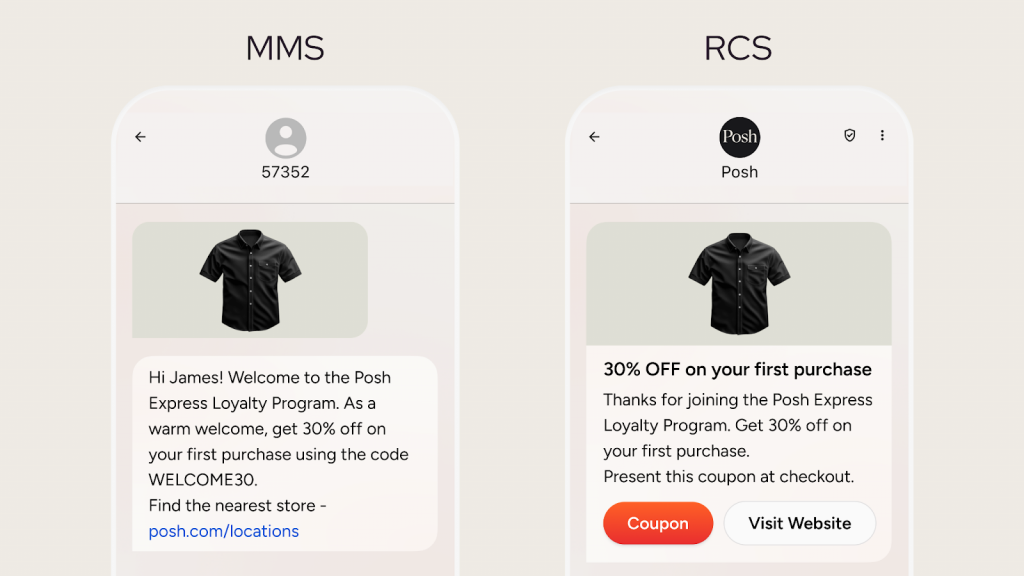
Free SMS tiers exist, but carrier fees never disappear. A “free” plan with a limited message allotment still costs money in carrier fees per segment.
- Omnisend: Free tier includes SMS credits, but multimedia messaging service (MMS) costs extra and carrier fees apply
- Mailchimp: SMS restricted to paid plans; free tier is email-only
Total cost of ownership on a free tier: platform fee may be waived, but carrier fees still add up. Your actual cost isn’t truly free.
Free tiers become more expensive than paid plans with volume discounts once you exceed your plan’s included volume.
Which tools work best for enterprise and high-volume sending?
At very high send rates, standard throughput caps become a severe bottleneck. A flash sale that takes too long to deliver loses its urgency.
| Sender type | Throughput | Approval time | Best for |
| 10DLC | Lower | Can take weeks | Steady-state campaigns |
| Toll-free | Medium | Can take weeks | Mid-volume sends |
| Short code | Highest | Can take longer | Flash sales and bursts |
- Attentive: Short code support and dedicated deliverability teams
- Insider One: Architect supports SMS at scale with predictable monthly tracked users (MTU)-based pricing, no hidden overage charges, and native short code support
Enterprise tools aren’t justified if you send at modest volumes.
If you’re evaluating short code vs 10DLC and want to assess throughput, SLAs, and real costs before you commit, start in the product demo hub and compare how enterprise-grade sending is actually handled.
How do you implement ecommerce SMS automation the right way?
The most common SMS implementation mistake isn’t technical. It’s launching flows before confirming opt-in proof is stored, quiet hours are enforced, and frequency caps are set. If your team lacks dedicated compliance review, budget extra time for legal checks before launch.
How should you set objectives and guardrails?
Aggressive frequency drives short-term revenue but rapidly accelerates list fatigue.
SMS-specific guardrails:
- Frequency cap: Set a clear monthly frequency cap per subscriber across all flows
- Quiet hours: Avoid messages during overnight hours in the subscriber’s local timezone
- Opt-out threshold: Pause and review any campaign where the opt-out rate exceeds your acceptable threshold
Which high-value journeys should you map first?
Launching all flows at once creates debugging chaos. Start with the flow that has the highest revenue impact and the lowest implementation complexity.
- Launch first: Abandoned checkout (high impact, low complexity)
- Launch second: Post-purchase updates (builds trust quickly)
- Launch third: Browse abandonment (requires product feed connection)
- Launch later: Winback and replenishment (require historical data)
If your product catalog changes frequently, delay back-in-stock alerts until your product feed sync is stable.
If you want a faster path to launch without increasing unsubscribes, book a demo and we’ll map the initial journeys with the guardrails that prevent overlap, fatigue, and wasted sends.
How should you build segments and audiences?
A common error: the consent field is populated but not synced in real time. A user opts out but still receives the next scheduled message.
Validation steps before launch:
- Confirm consent state is accurate by testing with known opt-outs
- Verify timezone normalization by sending a test during evening hours local time
- Check for overlap between flows so users don’t receive multiple triggers in a short period
How should you create message templates and compliance rules?
Every SMS must include brand identification and opt-out instructions. Forgetting these is a Telephone Consumer Protection Act (TCPA) violation carrying per-message penalties.
Compliant templates:
- Abandoned cart: “{{brand_name}}: You left {{product_name}} in your cart. Complete your order: {{link}} Reply STOP to opt out”
- Back-in-stock: “{{brand_name}}: {{product_name}} is back! Get yours before it’s gone: {{link}} Reply STOP to opt out”
- Shipping update: “{{brand_name}}: Your order has shipped! Track it here: {{link}} Reply STOP to opt out”
Add conditional logic to suppress messages if a product goes out of stock.
If you’re tightening compliance and want examples of how teams implement consent checks, quiet hours, and STOP/HELP handling inside real journeys, browse the product demo hub and take what’s useful.
How should you test, measure, and iterate?
If your list is small, statistical significance takes too long for standard A/B tests. Focus on qualitative feedback instead.
For larger lists:
- Weekly: Review opt-out rates by flow and pause any exceeding your acceptable threshold
- Monthly: Compare revenue per send across flows and reallocate budget
- Quarterly: Run holdout tests to measure incremental lift versus a control group
What should ecommerce brands know about SMS costs, carrier fees, and 10DLC?
Platform pricing is the smallest part of your SMS cost. Carrier fees, MMS multipliers, and sender registration add up faster than most teams expect.
How do carrier fees affect unit economics?
Calculate profitability per flow, not just cost per message.
- Revenue per send: Conversions multiplied by average order value (AOV), divided by messages sent
- Cost per send: Platform fee per message plus carrier fee per segment
- Profit per send: Revenue per send minus cost per send
If your conversion rate drops very low, most flows become unprofitable.
How does 10DLC registration and compliance work?
10DLC registration can take weeks for brand approval and additional time for campaign vetting. Carriers now block unregistered SMS traffic, so plan accordingly before any major promotion.
Registration checklist:
- Register your brand with The Campaign Registry
- Submit campaign use cases for marketing or transactional sends
- Await vetting (ensure your privacy policy is clearly linked)
- Configure quiet hours and mandatory keyword support
Always include “Reply STOP to unsubscribe” and “Reply HELP for support” in your campaigns. If your campaign is rejected, you cannot send on that number until it’s resubmitted and approved.
If you’re planning a high-stakes promo and don’t want 10DLC timing or filtering to be a surprise, book a demo and we’ll show how to structure sending, compliance, and fallbacks before launch.
How does Insider One power ecommerce SMS automation?
Insider One helps brands orchestrate SMS with email, WhatsApp, web push, and app push across channels.
- Architect: Unifies SMS, email, WhatsApp, web push, and app push with cross-channel suppression and AI-powered send-time optimization
- Unified customer profiles: Insider One’s customer data platform (CDP) syncs consent, behavior, and purchase data in real time
- Sirius AI™: Sirius AI™, Insider One’s extensive set of AI capabilities, includes predictive segments and A/B Auto-Winner Selection that optimizes SMS variants automatically
- Predictable pricing: MTU-based pricing with no hidden charges for data, storage, or duplicated events
If you’re ready to stop treating SMS like a silo and start running it as part of one coordinated journey, go to the product demo hub to see Architect in action before you loop in IT.
Frequently asked questions
Yes, but it requires explicit opt-in consent, brand identification in every message, and STOP/HELP keyword support. The Telephone Consumer Protection Act (TCPA) in the US and the General Data Protection Regulation (GDPR) in the EU govern these requirements by region.
10DLC is the registration system for application-to-person SMS in the US. Without proper registration, carriers will heavily filter or block your messages.
Most ecommerce brands cap volume at a small handful of messages per subscriber per month across all flows. Exceeding this limit increases opt-out rates and list fatigue.
Yes, and doing so simplifies suppression logic and cross-channel timing. Platforms like Klaviyo, Omnisend, and Insider One support both channels in a unified journey builder.
Short codes support very high throughput but can take months to approve. 10DLC is faster to set up but has a much lower throughput limit.

Keep Reading
7 min.

Muharrem Derinkok
4 Jun 2026
11 min.

Chris Baldwin
2 Jun 2026
4 min.
Chris Baldwin
3 Feb 2026