

 Platform Overview

 Integration Hub

 Agent One™

 Agent One Teams™

 Customer Data Management

 Personalization

 Journey Orchestration

 Reporting & Data

 Behavioral Analytics

 Web
Web

 Email
Email

 Site Search

 Conversational CX

 WhatsApp

 Web Push

 InStory

 App
App

 SMS & RCS

 Join the $0 Migration Movement™

 The Insider One Difference

 Compare Vendors

 Switch to Insider One

 Success Story

 Retail & Ecommerce

 Financial Services

 Travel & Hospitality

 Beauty & Cosmetics

 Automotive

 Telecommunications

 Total Economic Impact™ Study

 Blog
Blog

 E-Books & Guides

 Glossary
Order Confirmation Emails: Real Examples & Best Practices

Updated on 19 Jun 2026
12 min.
Table of Contents
- Summary
- What is an order confirmation email?
- Why order confirmation emails matter
- What to include in an order confirmation email
- What are the best practices for order confirmation emails?
- How should mobile-first design support visual hierarchy?
- How do you protect deliverability for transactional emails?
- How should you use personalization and dynamic content?
- Which self-serve links reduce support tickets?
- What's the difference between the order confirmation page and the email?
- How should you handle payment status wording and PCI-safe details?
- Which order confirmation email templates should you use?
- What do strong order confirmation email examples look like?
- What should you do when customers don't receive the confirmation?
- How should you localize confirmations for international orders?
- How does Insider One power order confirmation emails?
- Frequently asked questions
Most Popular

Summary
Order confirmation emails are critical post-purchase touchpoints that reassure customers, reduce support inquiries, and create opportunities for additional engagement. Effective confirmations include essential order details, delivery expectations, self-service options, and reliable deliverability, while platforms like Insider One help brands automate personalized, high-performing post-purchase experiences at scale.
Order confirmation emails are the most-opened messages you send. Yet most brands treat them as an afterthought. A customer completes checkout, anxiety spikes, and the confirmation either arrives instantly with everything they need or it doesn’t show up at all. That gap between transaction and reassurance is where support tickets multiply, trust erodes, and revenue opportunities disappear.
What is an order confirmation email?
The instant a customer clicks “Place Order,” an event fires in your dedicated commerce platform. The order confirmation email is the first automated response to that event.
It’s a transactional message, not marketing. It confirms the purchase succeeded, summarizes what was bought, and sets expectations for what happens next.
What’s the difference between order confirmation, receipt, shipping, delivery, and payment emails?
People often confuse these email types. They’re triggered by different events and serve different purposes.
| Email type | Trigger event | Primary purpose | Compliance notes |
| Order confirmation | Checkout completed | Acknowledge order receipt | Transactional exemption applies |
| Payment receipt | Payment Confirmed | Provide proof of payment | Required for tax and accounting |
| Shipping confirmation | Order dispatched | Share carrier tracking info | Transactional exemption applies |
| Delivery notification | Package dropped off | Confirm physical receipt | Transactional exemption applies |
| Payment failure | Card declined | Prompt payment update | Urgent transactional notice |
Some platforms combine the confirmation and receipt into a single message. This works fine as long as the email clearly states payment status and includes all required fields. Teams processing high volumes of pre-orders or backorders should keep confirmation and payment emails separate since the payment status can change after the order is placed.
Why order confirmation emails matter
Confirmations are the highest-opened emails you send. That attention is an asset. It becomes a liability if the email fails to arrive or fails to answer the customer’s immediate questions.
- Reduces support load: A clear confirmation with tracking and self-serve links deflects Where is my order (WISMO) tickets before they’re created
- Builds trust at a vulnerable moment: Post-purchase anxiety peaks in the minutes after checkout, and a fast confirmation reassures customers the transaction succeeded
- Creates a durable reference: Customers search their inbox for order details weeks later
- Opens a revenue channel: High engagement makes confirmations a low-risk place to introduce cross-sell recommendations or loyalty program enrollment
If your confirmations aren’t actively deflecting WISMO and driving the next action, book a demo to see how Insider One orchestrates post-purchase messaging without turning a transactional email into a support magnet.
What to include in an order confirmation email
Confirmations must balance completeness with scannability. Overloading the email buries critical information. Underloading it generates support tickets.
| Field | Tier | Rationale |
| Order number | Required | Essential for support inquiries and tracking |
| Itemized list with prices | Required | Confirms correct products and quantities |
| Payment summary | Required | Shows total, taxes, and discounts applied |
| Billing and shipping addresses | Required | Verifies destinations |
| Estimated delivery date | Required | Sets expectations |
| Tracking link | Required | Enables self-serve order management |
| Customer service contact | Recommended | Provides escalation path |
| Returns policy summary | Recommended | Reassures customers |
| Order modification deadline | Recommended | Clarifies window for changes |
| Customs/duties estimate | Conditional | For international orders |
| Download links | Conditional | For digital goods |
| Booking details | Conditional | For reservations |
One common issue for teams is including promotional content above the fold that pushes order details below the scroll. Transactional emails have legal protections under CAN-SPAM only when the primary purpose is transactional. Burying order details under marketing content risks reclassification.
If you want a fast way to evaluate your confirmation against this “required vs. nice-to-have” list, start with the real-world layouts in the product demo hub.
What are the best practices for order confirmation emails?
How should mobile-first design support visual hierarchy?
Most order confirmations are opened on mobile within minutes of purchase. Customers are often still in-store or in transit. If the email requires horizontal scrolling or buries the order number below a header image, it fails its primary job.
- Single-column layout: Eliminates horizontal scroll on all screen sizes
- Order number above the fold: The first piece of information visible without scrolling
- Tappable tracking link: Large enough tap target size for mobile
- Alt text on all images: Confirmations often load with images blocked by default
- Dark mode compatibility: Test that text remains readable when device settings invert colors
Heavily branded confirmations with large hero images perform well for brand reinforcement but slow load times and push critical details down. Teams prioritizing support deflection should lead with order details. Those prioritizing brand experience can lead with imagery, as long as order details remain above the fold.
How do you protect deliverability for transactional emails?
Sometimes a customer sees the thank-you page after checkout but never receives the confirmation email. They check spam, find nothing, and contact support. The root cause is often a deliverability issue that marketing teams don’t monitor because transactional emails live outside their usual campaign tools.
- Dedicated sending stream: Separate transactional emails from marketing emails using a dedicated IP address or subdomain
- Authentication records: Sender Policy Framework (SPF), DomainKeys Identified Mail (DKIM), and Domain-based Message Authentication, Reporting, and Conformance (DMARC) properly configured for the sending domain
- Bounce handling: Automated suppression of hard bounces to protect sender reputation
- Resend logic: A process to resend confirmations on request without creating duplicates
Teams sending low volumes don’t always need a dedicated IP address. They can rely on shared infrastructure from a reputable email service provider (ESP). Authentication records remain mandatory regardless of volume.
If you’re not sure whether your transactional stream is quietly leaking confirmations into spam, book a demo and we’ll show you how to operationalize deliverability for post-purchase, without adding more tools or dashboards.
How should you use personalization and dynamic content?
Confirmations can include personalized product recommendations, loyalty point balances, or segment-specific messaging. Every dynamic element introduces a failure mode. A broken recommendation block or missing loyalty balance creates a worse experience than a static email.
- Always personalize: Customer name, order details, and delivery address are transactional requirements
- Personalize with fallbacks: Product recommendations require a fallback block if the recommendation engine returns empty
- Avoid personalizing: Promotional offers that depend on real-time inventory since stock can change between email generation and open
Aggressive personalization increases relevance but also increases QA burden. Teams without automated rendering tests across email clients should limit dynamic content to fields with reliable data sources and clear fallbacks.
Which self-serve links reduce support tickets?
Where is my order (WISMO) inquiries are among the highest-volume support tickets for ecommerce brands. Most of these tickets are avoidable if the confirmation email surfaces self-serve options prominently.
- Track my order: Direct link to carrier tracking or order status page, not a generic account link
- Edit or cancel my order: Link to modification options with a clear deadline
- Returns and exchanges: Link to returns portal or policy page
- Contact support: Visible but not primary
The modification window depends on fulfillment speed. Brands with same-day fulfillment offer no modification window at all, while brands with longer lead times can offer more flexibility. The confirmation should state the deadline explicitly.
To see how top teams package “track, change, return” into a single, tappable block customers actually use, browse the product demo hub.
What’s the difference between the order confirmation page and the email?
Sometimes the thank-you page shows one delivery estimate, but the email shows another. This happens when the page and email pull from different data sources or when the email is delayed.
The thank-you page provides immediate confirmation that the order was received. It shows preliminary estimates before fulfillment processing completes. The email confirmation is a durable record sent after the order is fully processed. It should reflect final details including accurate delivery estimates.
If your fulfillment system updates order details after initial submission, delay the email confirmation until processing completes rather than sending immediately with preliminary data.
How should you handle payment status wording and PCI-safe details?
Order confirmations should never include full payment card numbers because payment emails should show only masked card details, such as the last four digits. In some ecommerce setups, order metadata can populate email templates, so teams should confirm that payment fields are masked before sending.
- Do: Show a partial card reference, such as “Visa ending in XXXX”
- Do: State payment status clearly, distinguishing between “Payment authorized” and “Payment captured”
- Don’t: Include full card numbers, card verification value (CVV), or expiration dates
- Don’t: Use ambiguous language like “Payment received” if the charge is only authorized but not yet captured
Authorization confirms the card is valid and funds are available. Capture actually moves the funds. Pre-order confirmations should say “Payment authorized” with a note that the charge will be captured at shipment.
Which order confirmation email templates should you use?
Most email platforms use different templating languages like Liquid, Handlebars, or Jinja. Here are plain-text copy templates with variable placeholders you can adapt.
Standard ecommerce confirmation
Subject: Order {{order_number}} confirmed
Preheader: We received your order and are getting it ready.
Hi {{customer_first_name}},
Thanks for your order. Here are the details:
Order number: {{order_number}}
[Itemized product list]
Total: {{order_total}}
Estimated delivery: {{estimated_delivery_date}}
[Track Order] | [Edit Order] | [Contact Support]
Digital goods confirmation
Subject: Your download is ready
Hi {{customer_first_name}},
Your purchase is ready to access.
[Download Now]
License key: {{license_key}}
Order number: {{order_number}}
Total: {{order_total}}
Booking confirmation
Subject: Booking confirmed for {{reservation_date}}
Hi {{customer_first_name}},
Your reservation is confirmed.
Confirmation number: {{confirmation_number}}
Date: {{reservation_date}}
Time: {{reservation_time}}
Location: {{location_name}}
[Add to Calendar] | [Cancel or Modify]
Free cancellation up to a cutoff time before your booking.
Always test templates with real order data before going live. Variable syntax differs across platforms.
What do strong order confirmation email examples look like?
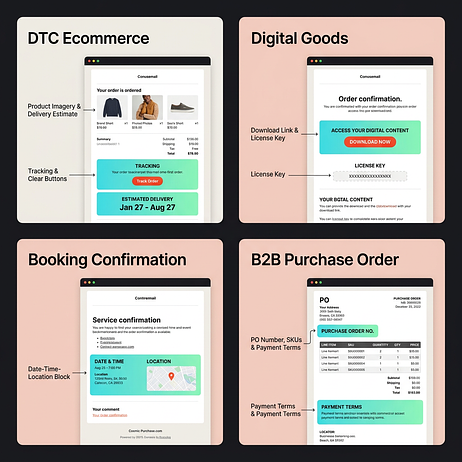
Most example galleries show DTC ecommerce confirmations, but the structure changes significantly for digital goods, bookings, and B2B orders.
How should a DTC ecommerce confirmation look?
A clean header with logo sits above a prominent order number. An itemized list with product images follows, leading into a clear delivery estimate and tracking link. Promotional content appears below the fold.
Why it works: The order number is the first text element after the logo. Product images confirm the correct items were purchased, and self-serve tracking links reduce support inquiries.
How should a digital goods confirmation look?
Download links or access instructions appear above the fold. The license key is clearly formatted. There’s no shipping section.
Why it works: Customers get immediate access to the purchased content without requiring a separate login.
How should a booking or reservation confirmation look?
The date, time, and location are prominent. A calendar add button and inline cancellation policy sit next to a confirmation number formatted for easy reference at check-in.
Why it works: All information needed at the point of service is visible without scrolling.
How should a B2B purchase order confirmation look?
The purchase order (PO) number and billing entity sit above an itemized list with stock keeping units (SKUs). Payment terms and a contact for procurement questions are clearly stated.
Why it works: The structure is optimized for forwarding to accounts payable.
If you’re redesigning confirmations across channels (DTC, digital, bookings, B2B) and want to see how dynamic blocks and fallbacks behave in real builds, book a demo and we’ll walk you through working examples.
What should you do when customers don’t receive the confirmation?
Customers searching for a missing confirmation should:
- Check their spam folder
- Search for the retailer’s name
- Verify the email address on file
- Contact the merchant with order details
For merchants fielding these requests:
- Verify the email address: Typos at checkout are common
- Check delivery logs: Most email service providers (ESPs) provide delivery status to identify whether the email left your system
- Review authentication: A sudden drop in delivery often indicates a Domain Name System (DNS) change that broke SPF or DKIM
- Check suppression lists: The customer’s email may be suppressed from a previous hard bounce
- Resend safely: Use an idempotent resend process that doesn’t create duplicate emails
When resending, acknowledge the delay: “Hi {{customer_first_name}}, you recently reached out about a missing confirmation. Here are the details for order {{order_number}}.”
How should you localize confirmations for international orders?
International orders require additional fields and formatting adjustments.
- Currency display: Show the currency code like USD or EUR alongside the symbol
- Tax and value-added tax (VAT): Display tax as a separate line item with the correct label for the region
- Customs and duties: For delivered duty paid orders, confirm duties are included
- Address formatting: Use the recipient country’s standard address format
- Language: Send confirmations in the customer’s preferred language if your system supports localization
Full localization requires significant template and data infrastructure investment. Teams with limited international volume can start with currency and tax adjustments while using English templates.
If you’re scaling beyond one market and need confirmation templates that localize cleanly without breaking layout or data rules, explore the walkthroughs in the product demo hub.
How does Insider One power order confirmation emails?
The best practices in this article require unified customer data, reliable transactional email delivery, and the ability to personalize without introducing failure modes. Insider One brings these capabilities together.
- Unified customer profiles: Order data, browsing behavior, and loyalty status in one place so confirmations include accurate personalization without pulling from multiple systems
- Architect, Insider One’s customer journey orchestration solution: Trigger confirmations as part of a broader post-purchase journey that includes shipping updates, delivery notifications, and review requests
- Sirius AI™, Insider One’s extensive set of artificial intelligence (AI) capabilities: Generate personalized product recommendations with automatic fallbacks so recommendation blocks never render empty
- Deliverability infrastructure: Dedicated transactional sending streams with authentication and bounce handling built in
If you’re ready to make confirmations a reliable, measurable part of your post-purchase strategy, book a demo and see how Insider One runs the entire flow end to end.
Frequently asked questions
Not always. An order confirmation acknowledges that an order was placed. A receipt confirms that payment was captured. Some businesses combine both into a single email, but they serve different purposes and may have different legal standing depending on your jurisdiction.
Most ecommerce platforms allow you to resend confirmations from the order detail page in your admin. Before resending, verify the customer’s email address is correct and check your delivery logs to confirm the original email wasn’t already delivered to spam.
Yes, but keep it secondary to the transactional content. The primary purpose of the email must remain transactional to maintain CAN-SPAM exemption. Place promotional content below the fold, after all order details.
Order confirmation is sent immediately after purchase to acknowledge the order was received. Shipping confirmation is sent later when the order is dispatched and includes carrier tracking information. They serve different purposes and should be separate emails.
Yes. The page provides immediate confirmation at checkout, while the email provides a durable record the customer can reference later. If your fulfillment system updates order details after submission, the email should reflect final details rather than preliminary estimates from the page.
Lead with download links or access instructions rather than shipping details. Include any license keys or access codes prominently formatted, and provide clear instructions for accessing the purchase without requiring a separate login.

Keep Reading
7 min.

Muharrem Derinkok
4 Jun 2026
11 min.

Chris Baldwin
2 Jun 2026
4 min.
Chris Baldwin
3 Feb 2026