

 Platform Overview

 Integration Hub

 Agent One™

 Agent One™ Teams

 Customer Data Management

 Personalization

 Journey Orchestration

 Reporting & Data

 Behavioral Analytics

 Web
Web

 Email
Email

 Site Search

 Conversational CX

 WhatsApp

 Web Push

 InStory

 App
App

 SMS & RCS

 Join the $0 Migration Movement™

 The Insider One Difference

 Compare Vendors

 Switch to Insider One

 Success Story

 Retail & Ecommerce

 Financial Services

 Travel & Hospitality

 Beauty & Cosmetics

 Automotive

 Telecommunications

 Total Economic Impact™ Study

 Blog
Blog

 E-Books & Guides

 Events

 Glossary
Marketing Automation Segmentation: How to Build Targeted Campaigns

Updated on 5 Oct 2026
9 min.
Table of Contents
Most Popular
Summary
Marketing automation segmentation uses real-time customer behavior to keep audiences accurate and campaigns relevant. Success depends on high-quality data, dynamic segments, and rules that prevent overlapping messages.
Audience segmentation isn’t difficult. Keeping segments accurate as customer behavior changes is. Marketing automation uses dynamic, rule-based segmentation to continuously update audiences based on real-time actions, so campaigns reach customers when intent is highest, not after the opportunity has passed.
What is marketing automation segmentation?
You send a campaign to a list of users who viewed product pages multiple times or abandoned a cart recently, but many of the recipients were already converted by the time you pulled the list. This is the problem with static segmentation.
Marketing automation segmentation solves this by making segments dynamic. A segment defined as “abandoned cart recently, no purchase, email opted-in” re-evaluates membership every time a user’s behavior changes. When someone completes a purchase, they exit automatically. When someone new abandons a cart, they enter.
The mechanics rely on a few core components:
- Rule-based membership: Boolean conditions evaluate against user attributes and events
- Time windows: Conditions like “viewed product page recently” create rolling eligibility
- Event triggers: Specific actions instantly qualify or disqualify users
- Suppression logic: Exclusions prevent users in one journey from entering another
| Static list | Dynamic segment |
| Pulled at a point in time | Evaluates continuously |
| Requires manual refresh | Updates automatically |
| Risk of stale targeting | Always reflects current state |
| Good for one-time sends | Built for automated journeys |
Why does marketing automation segmentation matter?
You already know personalization improves engagement, so what can automation-specific segmentation unlock compared to manual approaches?
Without dynamic segmentation, automation often sends messages that no longer match current user behavior. You’re sending more messages, faster, to the wrong people.
- Relevancy at velocity: Automated journeys are only as relevant as the segments feeding them
- Deliverability hygiene: Sending to disengaged users tanks sender reputation. Dynamic segments can exclude users who haven’t opened in a long time
- Fatigue prevention: Without segment-level frequency caps, users in multiple journeys receive conflicting messages
- Conversion lift from timing: Real-time segments catch users at peak intent. With nearly 70% of online carts abandoned on average, a cart abandonment message sent soon after the action converts better than one sent much later
Types of customer segmentation in marketing automation
The classic four models appear in every marketing textbook. They’re useful context, but they rarely drive journey logic on their own.
- Demographic: Age, gender, income. Useful for broad personalization but rarely sufficient for journey triggers
- Geographic: Location, time zone. Relevant for localized offers and send-time optimization
- Psychographic: Values, interests, lifestyle. Requires survey or quiz data and is harder to operationalize at scale
- Behavioral: Actions taken. The foundation for most automation rules
Automation-native models actually drive journey logic:
- Lifecycle stage: New, active, at-risk, lapsed. Defines which journey a user should enter
- Engagement scoring: Composite score based on recency, frequency, and depth of interaction
- Recency, frequency, monetary value (RFM): Segments users by when they last purchased, how often, and how much they spend
- Intent signals: Browse behavior, search queries, wishlist additions. Indicates purchase readiness without requiring a conversion event
- Predictive: Machine learning (ML)-driven segments predicting likelihood to purchase, churn, or respond to discount
Start with lifecycle and engagement. They require minimal data and deliver high impact. Layer RFM when you have purchase history. Add predictive models last, once you have volume and clean historical data.
| Model | Primary inputs | Automation use | Complexity |
| Lifecycle | Events, time since action | Journey entry/exit | Low |
| Engagement score | Opens, clicks, visits | Channel selection, send priority | Medium |
| RFM | Purchase events | Loyalty, win-back | Medium |
| Intent signals | Browse, search, wishlist | Triggered campaigns | Medium |
| Predictive | Historical behavior + ML | Discount targeting, churn prevention | High |
If you have a relatively small active user base or limited behavioral history, predictive models won’t have enough signal. Start with rule-based segments and graduate to ML once data volume supports it.
How does marketing automation segmentation work?
Segments that look right in the builder often produce unexpected results in production. Consider a segment defined as “purchased recently.”
It includes users who purchased a while ago and are about to churn, alongside users who purchased very recently. The logic is correct. The intent is wrong.
Step one: Align data and traits
Segment quality is bounded by data quality. A segment rule that references “last_purchase_date” fails silently if that field isn’t syncing from your ecommerce platform.
Before building segments, audit what’s available:
- Identity resolution: Can you tie anonymous sessions to known profiles? Without this, many behavioral segments only work for logged-in users
- Event taxonomy: Are events named consistently? Inconsistent naming breaks rules
- Trait freshness: How often do user attributes update? A “VIP” flag that syncs daily won’t catch a user who just crossed the threshold
- Consent state: Is opt-in status available as a trait? Segments must respect channel-level consent
List the events most critical to your journeys. Confirm each event exists in your automation platform with consistent naming. Check sync frequency. Verify identity stitching. Use those signals to understand where users drop off, which actions correlate with conversion, and which traits should feed your segments.
If event taxonomy is inconsistent or identity resolution is broken, fix it before building segments. Patching around bad data with complex rules creates technical debt that compounds.
Step two: Build micro-segments
Start broad, then layer exclusions. A segment for “high-intent browsers” starts as “viewed product page multiple times recently.” Then add exclusions: “AND has not purchased recently AND is not in active cart abandonment journey AND email opted-in.”
| Use dynamic when… | Use static when… |
| Membership changes frequently | Audience is fixed |
| Segment feeds an automated journey | Segment is for a one-time campaign |
| Real-time eligibility matters | Historical snapshot is acceptable |
Reusable segment patterns:
- Engaged subscribers: Opened an email or clicked an email recently AND subscribed long enough ago to avoid immediate sends
- At-risk customers: Purchased a while ago AND no site visit recently
- High-intent browsers: Viewed product multiple times recently AND no purchase
- VIP customers: Lifetime purchase value above threshold OR purchase frequency above threshold
Preview segment size before activating. If it’s unexpectedly large or small, a rule is likely misconfigured. Check for volatility, too. A segment that swings wildly in size over time usually has a time-window issue.
Overly narrow segments that never reach minimum send volume create their own problems. If your segment is too small, the journey won’t generate statistically meaningful results.
Step three: Map segments to automated journeys
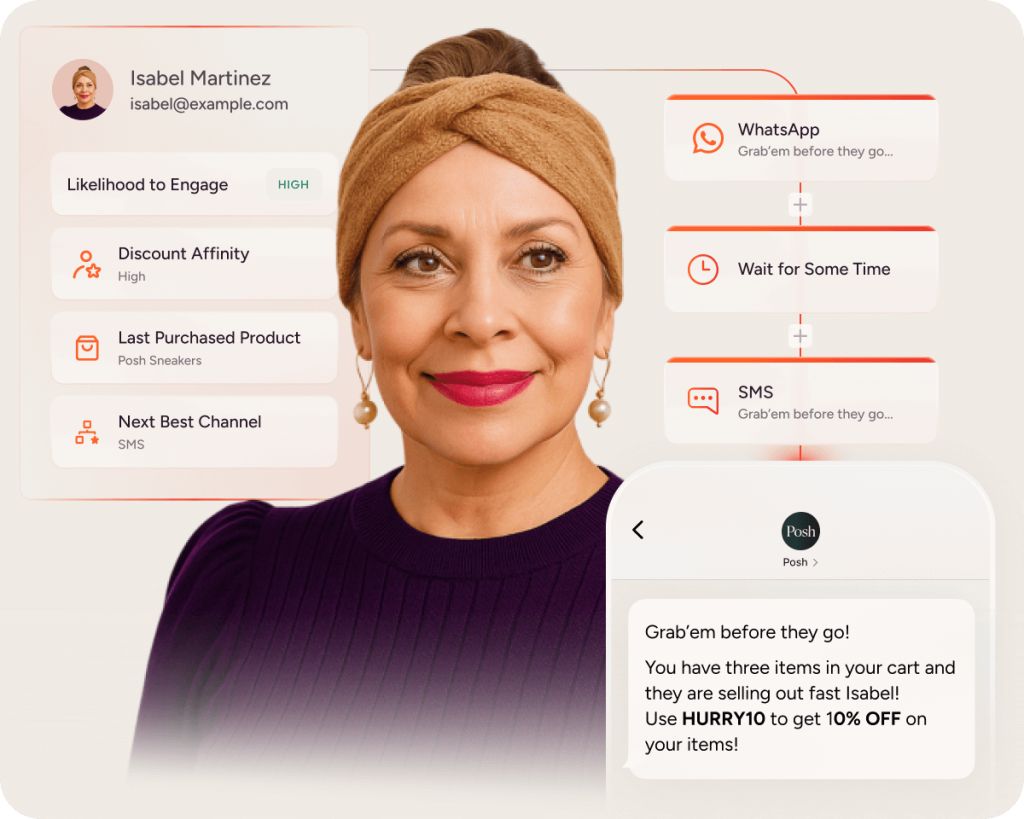
A segment without a journey is just a list. This step assigns segments to automated flows with clear entry criteria, branching logic, exit conditions, and cooldowns.
| Segment | Journey | Entry trigger | Exit criteria | Cooldown | Primary KPI |
| Cart abandoners | Cart recovery | cart_abandon event | Purchase OR time window elapsed | Set cooldown | Conversion rate |
| New subscribers | Onboarding | signup event | Completed onboarding OR time window elapsed | None | Activation rate |
| At-risk customers | Win-back | Time since purchase threshold met | Purchase OR unsubscribe | Set cooldown | Reactivation rate |
| High-intent browsers | Browse abandonment | Multiple product views, no cart | Add to cart OR time window elapsed | Set cooldown | Add-to-cart rate |
Users often qualify for multiple segments simultaneously. A user who abandoned a cart and is also a VIP qualifies for both cart recovery and a VIP-exclusive offer. Without arbitration, they receive both.
- Priority hierarchy: Assign priority levels to journeys. A cart recovery journey overrides a promotional journey
- Mutual exclusivity: Define segments that cannot overlap. A user in “active cart recovery” is excluded from “browse abandonment”
- Frequency caps: Limit total messages per user per time window
For software as a service (SaaS) marketing automation, map segments to lifecycle stages. Trial users enter an onboarding journey. Active users enter a feature adoption journey.
Users approaching renewal enter a retention journey. In ecommerce and retail, the same segmentation logic can power cart recovery, browse abandonment, localized promotions, and VIP experiences across web, app, email, and push, with each segment tied to distinct entry/exit criteria, channel logic, and KPIs.

Step four: Optimize with artificial intelligence (AI) and testing
Open rates and click rates tell you if people are engaged. They don’t tell you if segmentation caused incremental behavior change. A user who would have purchased anyway still opens and clicks.
To measure segmentation effectiveness, you need incrementality testing. Withhold a small random percentage of the segment from the journey. Compare conversion rate of the journey group vs. the holdout group. The difference is your incremental lift.
Without a holdout, you can’t distinguish between “this journey converted users” and “users who enter this segment were already likely to convert.” Selection bias is the silent killer of segmentation ROI claims.
- Engagement metrics: Opens, clicks, page views. Useful for diagnosing delivery and content issues
- Behavioral metrics: Add-to-cart, form starts, feature adoption. Closer to business outcomes
- Business metrics: Conversion rate, revenue per recipient, average order value (AOV). The metrics that matter
- Risk metrics: Unsubscribe rate, spam complaints, deliverability score. Guardrails against over-messaging
Platforms with AI capabilities can support personalization and optimization, but teams should also use behavioral analysis to understand drop-off points, retention patterns, and the events that define real buying intent. That combination reduces manual guesswork while still requiring holdout validation to confirm lift.
Running A/B tests on segments that are too small produces noise, not signal. If you don’t have enough users per variant, either increase segment size or extend test duration.
If you want to prove incremental lift (not just louder engagement), book a demo to see how teams operationalize holdouts, measurement, and AI-driven optimization without slowing campaigns down.
How can Insider One help?
Insider One’s customer data platform (CDP) supports segmentation through Audience, User Profiles, Segments, and a Unified Customer Database. Through identity resolution, Insider One stitches anonymous and known profiles, while behavior and event data from web, apps, APIs, and other sources help teams build richer audiences.
That foundation gives marketers cleaner audience management and segments that stay aligned with current behavior.
Architect, Insider One’s customer journey orchestration solution, turns segments into automated journeys across connected platforms. Teams can apply priority rules, frequency caps, and exit criteria in journey design to reduce overlap, coordinate messaging across channels, and keep programs easier to manage.
Insider One’s AI capabilities support personalization and optimization across customer experiences:
- Recommendations: AI-backed product recommendations can help match content and offers to user behavior
- Personalization: Experiences can adapt to user interests and engagement signals across channels
- Optimization: AI can help teams refine journeys and engagement strategy with less manual effort
- Analytics context: AI is most useful when it works alongside segmentation, orchestration, and behavioral analysis
For teams migrating from legacy platforms, Migration Lab™ is positioned around onboarding tasks such as data validation and segment recreation. Implementation outcomes still depend on source-data quality, journey complexity, and how carefully teams validate audience logic before launch.
If segmentation is the lever you’re pulling this quarter, book a demo to see how Insider One combines unified profiles, flexible audience management, cross-channel orchestration, and analytics-informed optimization in one platform.
Frequently asked questions
A list is a static snapshot of users pulled at a specific time. A segment is a dynamic query that re-evaluates membership continuously based on rules you define.
For triggered journeys like cart abandonment, segments should evaluate in real time or near-real time. For batch campaigns, daily refresh is typically sufficient.
Use priority rules to rank journeys by importance, mutual exclusivity rules to prevent overlap, and frequency caps to limit total messages per user per time window.
A holdout test withholds a random percentage of a segment from a journey to measure incremental lift. Comparing conversion rates between the journey group and holdout group reveals whether the automation caused behavior change or simply captured existing intent.
Start with a small set of core segments aligned to lifecycle stages and key behaviors. Add segments as you identify distinct audience needs, but avoid over-segmentation that fragments your audience into groups too small to generate meaningful results.

Keep Reading
4 min.

Chris Baldwin
3 Feb 2026
8 mins.
Chris Baldwin
8 Oct 2026
8 mins.
Chris Baldwin
8 Oct 2026