

 Platform Overview

 Integration Hub

 Agent One™

 Agent One Teams™

 Customer Data Management

 Personalization

 Journey Orchestration

 Reporting & Data

 Behavioral Analytics

 Web
Web

 Email
Email

 Site Search

 Conversational CX

 WhatsApp

 Web Push

 InStory

 App
App

 SMS & RCS

 Join the $0 Migration Movement™

 The Insider One Difference

 Compare Vendors

 Switch to Insider One

 Success Story

 Retail & Ecommerce

 Financial Services

 Travel & Hospitality

 Beauty & Cosmetics

 Automotive

 Telecommunications

 Total Economic Impact™ Study

 Blog
Blog

 E-Books & Guides

 Events

 Glossary
What is In-app Messaging? How It Drives Retention Across the Full User Lifecycle

Updated on 19 Jun 2026
10 min.
Table of Contents
- Summary
- What in-app messaging actually is (and what it is not)
- Why the channel outperforms push on conversion (and when it does not)
- A lifecycle-stage playbook: matching message type to moment
- Frequency, fatigue, and the governance rules teams skip
- Measuring in-app messaging beyond impression count
- Frequently asked questions
Most Popular
Summary
In-app messaging drives engagement and conversions by reaching users while they’re actively using an app, without relying on push notification opt-ins. Success depends on using the right message format for the right moment, controlling message frequency to avoid fatigue, and measuring impact through engagement, conversion, and retention metrics rather than impressions alone.
Somewhere between launch day and month three, most mobile apps lose a significant share of the users they worked hard to acquire. The drop isn’t usually caused by a product problem. It’s caused by a communication problem: users don’t hear from the app at the right moment, in the right context, with information that helps them get value faster.
Push notifications are the default answer, but they only reach users who’ve opted in, and they arrive when the user isn’t in the app. That’s the gap in-app messaging was built to fill.
The challenge is that most published guidance on in-app messaging either reads like an SDK setup doc or stops at a surface-level comparison with push.
What growth and customer relationship management (CRM) teams actually need is a lifecycle framework: which message types work at which stage, when to trigger them, how often to send them, and how to know whether they’re working. That’s what this article covers.
What in-app messaging actually is (and what it is not)
In-app messaging refers to messages delivered to users while they are actively using your app. The session requirement is the defining characteristic. Unlike push notifications, which are delivered to a device whether the app is open or not, in-app messages only appear when a user is inside the product. That distinction has real consequences for targeting, timing, and what you can reasonably ask a user to do.
The four core formats in app-messaging
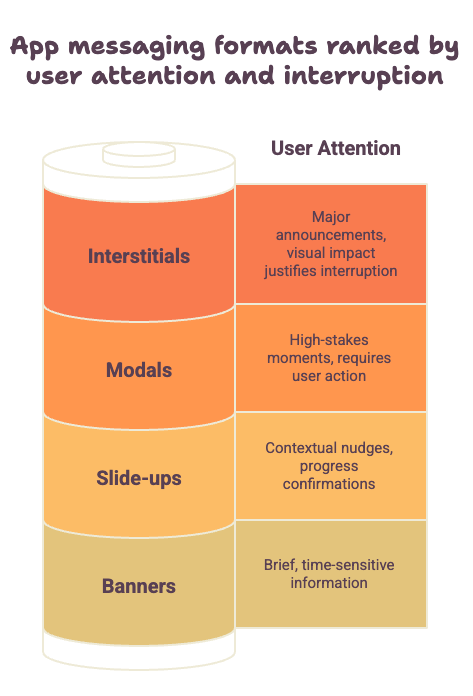
Each format carries a different weight in the user experience. Choosing the right one for a given moment is a strategic decision, not a design preference.
• Modals are center-screen pop-ups that are positioned on top of background content and require user action to dismiss. They command attention and are appropriate for high-stakes moments: first-time feature introductions, permission requests, or critical account actions. Overusing them trains users to dismiss without reading
• Slide-ups appear at the bottom of the screen and do not interrupt the user’s current view. They work well for contextual nudges, progress confirmations, and soft prompts that add value without demanding attention
• Banners sit at the top of the screen and are best suited for brief, time-sensitive information: a sale ending soon, a status update, a system alert, where low friction matters more than engagement
• Full-screen interstitials take over the entire display and are typically reserved for onboarding sequences, major product announcements, or upgrade offers where visual impact justifies the interruption
The format selection question isn’t “what looks good?” It’s “how much of the user’s attention does this message deserve, and how much interruption is the context willing to tolerate?”
Why the channel outperforms push on conversion (and when it does not)
A user who is actively inside your app has already made a decision. They opened the app, they’re browsing, they’re doing something. That demonstrated intent is what makes in-app messaging so effective for conversion-oriented goals.
You’re not asking a lapsed user to re-engage from a cold state. You’re reaching someone who is already warm, already moving through your product, and already open to guidance.
Push notifications, by contrast, are interruptive by design. They reach users outside the app and ask them to context-switch. That makes push powerful for win-back campaigns and time-sensitive alerts, but it also means the user’s intent level is lower and the friction to convert is higher.
The opt-in advantage
There’s another structural reason to invest in in-app messaging: it doesn’t require notification permissions. Push notifications are only delivered to users who have opted in, and opt-in rates have declined steadily as users become more selective about what they allow.
In-app messages bypass this entirely. Every active user, regardless of their notification settings, is reachable through in-app messaging during a session. For brands operating in high-opt-out environments, that alone makes in-app messaging a critical fallback channel.
This doesn’t mean in-app messaging replaces push. It means the two channels serve different jobs. Push re-engages. In-app converts. A well-designed cross-channel program uses both, sequenced intelligently based on where the user is and what they’ve already seen.
A lifecycle-stage playbook: matching message type to moment
The most common failure mode in in-app messaging programs is treating all active users as equivalent. A user in their first session has completely different needs from a user who has been active for 60 days and hasn’t discovered a core feature. Message type, format, trigger, and copy should all change depending on where the user is in their lifecycle.
Onboarding and activation
The first session and the first week are where you establish whether a user ever reaches the “aha moment” that creates lasting retention. In-app messaging during onboarding should be focused entirely on reducing friction and accelerating value. Full-screen interstitials work well for welcome sequences that orient users to the core workflow. Slide-ups work for contextual tips that appear at the exact moment a user encounters a new interface element.
Trigger logic here should be action-based, not time-based. A slide-up that fires after a user completes their first search is more effective than one that fires 30 seconds after session start. The former confirms they’ve taken a step; the latter is just noise at a random moment.
For example, DeFacto drove 8X higher conversion rates by combining behavioral triggers with personalized in-app and push messaging, rather than relying on broadcast sends to all active users. The behavioral trigger logic, not the feature alone, was the driver.
Feature discovery
Once a user is past initial onboarding, the retention risk shifts from “they don’t understand the product” to “they’re only using one part of it.” Feature discovery messages should surface capabilities the user hasn’t engaged with yet, at the moment when those capabilities are most contextually relevant.
A modal announcing a filtering feature is more effective when it fires after a user has scrolled past 20 results without refining their search than when it fires on the first session. The trigger tells the user “we noticed what you just did, and here’s something that helps.”
That context is what makes the message feel like a useful prompt rather than an interruption. Banners and slide-ups tend to outperform modals here because they don’t block the current action.
Retention reinforcement
Users who have been active for 30 or more days often need reinforcement signals to sustain the habit. Progress indicators, streak notifications, and personalized milestone messages all fall into this category.
These messages work best as slide-ups or banners and should reference real user data: sessions completed, goals achieved, items saved, rather than generic encouragement.
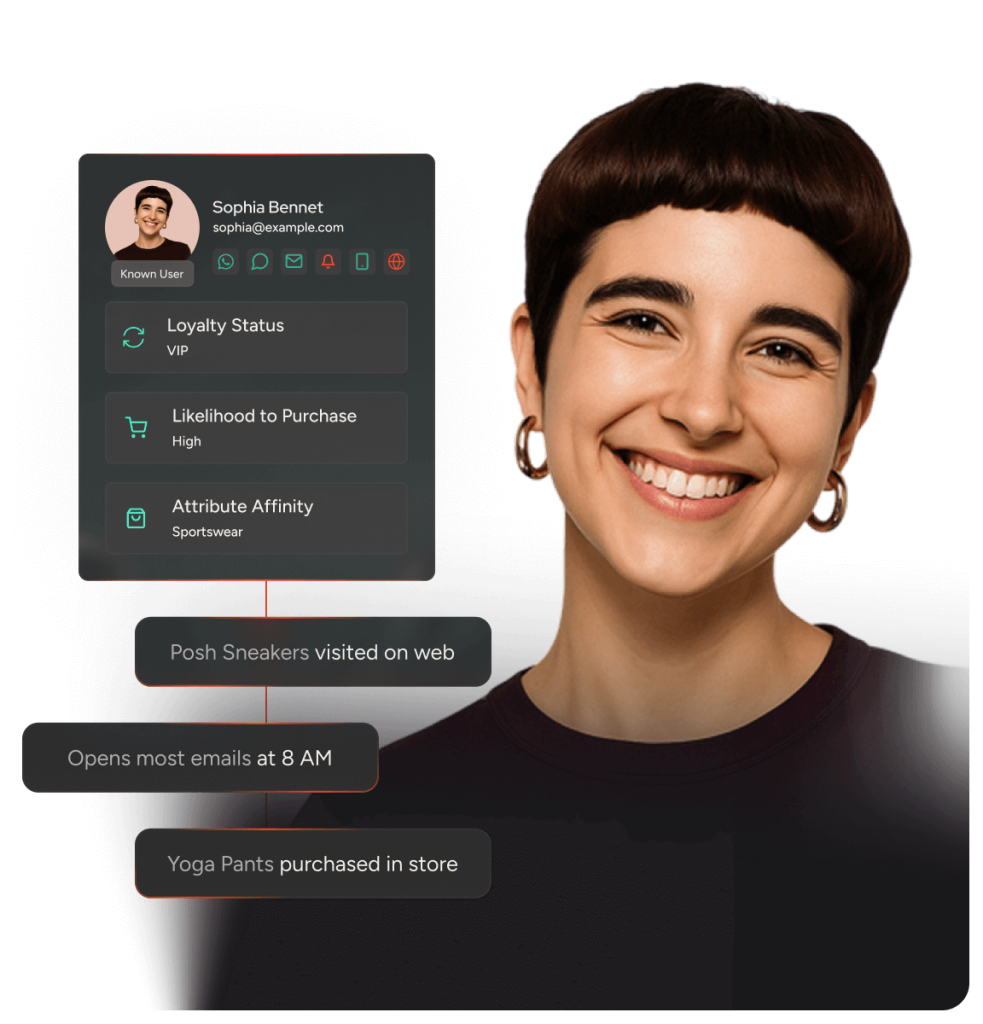
Customer Data Management is what makes this kind of personalization executable at scale. When behavioral data, session history, and lifecycle stage are unified in a single profile, the trigger logic and message content can adapt to individual users without manual segmentation for every campaign.
Upsell and upgrade
In-app messaging for upsell works when it’s timed to a high-value moment, not a billing calendar. A user who has just completed a significant action, exported a report, hit a usage limit, or used a premium feature for the first time in trial mode, is far more receptive to an upgrade message than a user who receives the same modal on day 14 regardless of behavior.
Full-screen interstitials can be justified here if the offer is substantial and the context is right. For softer upsell prompts, a modal with a clear value statement and a single call-to-action outperforms a feature list.
Frequency, fatigue, and the governance rules teams skip
A single well-timed in-app message creates value. Four in-app messages in a single session train users to dismiss everything without reading.
Frequency governance is the least glamorous part of in-app messaging strategy, and it’s the part that most programs underinvest in until the damage is already visible in dismiss rate data.
Building a governance model
A functional governance model has three components:
• Session caps: set a maximum number of in-app messages a user can receive in a single session. One to two is a practical ceiling for most apps; more than that and the experience starts to feel like a popup gauntlet
• Global suppression windows: define minimum intervals between any in-app message for a given user. If a user dismissed a message two hours ago, they probably shouldn’t see another one yet
• Priority queues: when multiple messages qualify for delivery in a session, the priority queue determines which one fires. Lifecycle-critical messages (onboarding steps, critical alerts) should always take precedence over promotional or upsell content
Cross-channel sequencing is the natural extension of this. If a user received a push notification about an offer three hours ago and opened the app directly from that push, showing them the same offer as an in-app modal is redundant at best and annoying at worst.
Journey Orchestration uses channel eligibility logic and engagement signals to determine which surface is appropriate at each touchpoint, avoiding the kind of message duplication that erodes trust over time.
Measuring in-app messaging beyond impression count
Impression counts tell you how many times a message appeared. They tell you almost nothing about whether the message worked. A complete measurement framework for in-app messaging tracks six metrics, each revealing something different.
• Impressions: baseline volume; confirms the message is being delivered as intended
• Interaction rate: clicks or taps as a share of impressions; measures whether the message earns engagement
• Dismiss rate: explicit dismissals as a share of impressions; a high dismiss rate often signals a format mismatch or a timing problem, not a copy problem
• Impression duration: how long users spend with the message before acting or dismissing; useful for diagnosing whether the copy is being read or reflexively dismissed
• Post-message conversion: the downstream action you actually care about, a feature adopted, a purchase completed, an upgrade initiated, measured in the session or within a defined window after the message
• Retention lift: the delta in D7 (Day 7) and D30 (Day 30) retention rates between users who received the message and a matched control group; this is what ties in-app messaging to business outcomes rather than engagement metrics
A/B testing that actually informs strategy
When testing in-app messages, the sequence matters. Test trigger event before format, and format before copy. The trigger determines whether the message reaches users at a high-intent moment.
The format determines whether it earns their attention. Copy optimization only becomes the marginal gain once the first two variables are right.
For statistical confidence, most in-app message tests need larger sample sizes than email tests because open rates aren’t a factor; every active user who qualifies sees the message.
Tie your test results back to D7 and D30 cohort data rather than optimizing for immediate click rate, which can favor aggressive formats that perform well on day one and accelerate fatigue by day seven.
Platforms like Insider One’s AI-powered platform can automate winner selection based on downstream conversion rather than surface-level click metrics, reducing the risk of optimizing for the wrong signal.
If you want to see how Insider One’s journey orchestration and customer data management turn live customer data into coordinated, revenue-driving experiences, book a personalized demo to see the exact use cases, decision logic, and growth levers most relevant to your team.
Frequently asked questions
In-app messaging is delivered while a user is actively using the app; push notifications are delivered to the device regardless of whether the app is open. Push requires notification permission; in-app messaging does not. Push excels at re-engagement; in-app messaging excels at conversion during active sessions.
A practical ceiling for most apps is one to two in-app messages per session, with a suppression window of several hours between any messages for a given user. The exact limits depend on your app category and user behavior data, but the general principle holds: frequency should be governed by engagement signals, not send volume targets.
In-app messaging should be sequenced with push, email, and SMS using channel eligibility logic, so users don’t receive the same message across multiple surfaces. The channel hierarchy is typically determined by where the user is (inside or outside the app), what action they’ve taken recently, and what their engagement history suggests about their preferred surface. Journey Orchestration lets teams build these cross-channel flows visually without hardcoding channel selection for every scenario.
Full-screen interstitials work well for the first-session orientation sequence because the user has no established workflow to interrupt. After the first session, slide-ups and contextual banners are generally more appropriate because they add guidance without blocking the actions the user is trying to complete.
Watch your dismiss rate and compare D7 and D30 retention between users who saw your in-app messages and a matched control group who didn’t. If dismiss rates are high and the retention lift is flat or negative, the messages are adding friction rather than value. That’s usually a signal to revisit trigger logic and session frequency before changing creative.

Keep Reading
7 min.

Muharrem Derinkok
4 Jun 2026
11 min.

Chris Baldwin
2 Jun 2026
4 min.
Chris Baldwin
3 Feb 2026