

 Platform Overview

 Integration Hub

 Agent One™

 Agent One Teams™

 Customer Data Management

 Personalization

 Journey Orchestration

 Reporting & Data

 Behavioral Analytics

 Web
Web

 Email
Email

 Site Search

 Conversational CX

 WhatsApp

 Web Push

 InStory

 App
App

 SMS & RCS

 Join the $0 Migration Movement™

 The Insider One Difference

 Compare Vendors

 Switch to Insider One

 Success Story

 Retail & Ecommerce

 Financial Services

 Travel & Hospitality

 Beauty & Cosmetics

 Automotive

 Telecommunications

 Total Economic Impact™ Study

 Blog
Blog

 E-Books & Guides

 Events

 Glossary
Email Pop Up Best Practices with Real Examples

Updated on 24 Sep 2026
16 min.
Table of Contents
- Summary
- What is an email pop-up and which type do you need?
- Why do email pop-ups still outperform other sign-up methods?
- Which pop-up types work for different page types and visitor segments?
- How do email pop-up best practices match user intent?
- How should you trigger pop-ups based on behavior?
- How should you match the offer to visitor intent and margin constraints?
- How do you keep forms short and copy benefit-focused?
- How do you segment and personalize by visitor status and source?
- How do you cap frequency and suppress after conversion?
- How do you design mobile-first to avoid search engine optimization (SEO) penalties?
- What should you test before design changes?
- How do you measure email pop-up performance beyond sign-up rate?
- What do email pop-up examples show in practice?
- How does Insider One help you build high-converting email pop-ups?
- Insider One vs. traditional point solutions
- Frequently asked questions
Most Popular
Summary
Effective email pop-ups rely on smart timing, controlled frequency, and testing the offer—not small design tweaks. Use behavior-based triggers (like scroll depth or exit intent), avoid annoying repeat visitors, and build a unified data foundation to scale beyond basic tools.
Most marketing teams treat email pop-ups like a necessary annoyance rather than a conversion lever. The result is predictable: generic modals that fire on page load, cause visitors to dismiss without reading, and deliver subscriber lists full of low-intent contacts who never convert.
Email pop-up best practices aren’t about choosing the right color scheme or writing clever copy. They’re about triggering based on behavior, managing frequency carefully to avoid fatigue, and testing the fundamentals that actually move conversion rates before you waste time on design tweaks.
Teams that unify customer data across channels consistently outperform those stitching together point solutions.
What is an email pop-up and which type do you need?
The term “email pop-up” means different things depending on who’s searching. A marketer building lead capture forms has different needs than someone trying to disable Outlook desktop alerts. This article focuses on website pop-ups for email capture.
An email pop-up is a modal overlay that appears on a website to collect an email address in exchange for value. That value usually takes the form of a discount, exclusive content, or early access.
Pop-ups differ from inline forms, which sit embedded within page content, and sticky bars, which remain persistent at the top or bottom of the screen without interrupting the user.
Why do email pop-ups still outperform other sign-up methods?
Pop-ups consistently outperform inline forms and footer sign-ups because they interrupt the browsing flow at a moment of engagement. This interruption forces a decision. You trade a slight risk of annoyance for a significantly higher opt-in rate.
Minimizing friction while capturing intent is the key. When you apply the right targeting rules, pop-ups drive list growth without damaging the user experience. Rates vary heavily by industry and offer quality, but pop-up modals generally convert at several times the rate of passive inline forms.
Which pop-up types work for different page types and visitor segments?
Higher-interruption formats like fullscreen modals can raise conversion rates, but they can also increase bounce rates. Lower-interruption formats like slide-ins and sticky bars reduce disruption, but they often convert less than modals. The right choice depends entirely on page type, traffic source, and visitor intent.
| Page type | Visitor segment | Recommended format | Rationale |
| Homepage | New visitor from paid ad | Slide-in or sticky bar | High bounce risk; don’t interrupt before showing value |
| Blog post | Organic visitor, meaningful scroll | Exit-intent modal | Intent is established; capture before they leave |
| Product page | Returning visitor, no purchase | Timed modal with incentive | High intent; a discount closes the gap |
| Checkout | Any | None or post-purchase | Interruption here kills conversion |
| Any high-intent page | Predictive High-Intent or VIP Tier (CDP-driven segment) | Personalized modal with dynamic AI-determined incentive | Sirius AI™ targets proactively based on purchase likelihood, not just session behavior |
A few format definitions:
- Modal: Centers on the screen and dims the background
- Slide-in: Appears in the corner without blocking main content
- Sticky bar: Anchors to the top or bottom of the viewport
- Fullscreen: Covers the entire browser window for maximum focus
- Gamified: Uses interactive elements like a prize wheel
If you want to match format to intent with real behavior rules (not gut feel), book a demo and we’ll show you how teams operationalize this without slowing down their site.
How do email pop-up best practices match user intent?
Most best practice lists repeat the same generic advice without context. The difference between a high-performing pop-up and an annoying one comes down to conditional logic. What works for a new mobile visitor is wrong for a returning desktop user.
How should you trigger pop-ups based on behavior?
A pop-up that fires shortly after page load interrupts the visitor before they’ve decided if the page is relevant. High close rates and trained dismissal behavior follow.
Set starting thresholds based on context:
- Blog and content pages: Trigger after meaningful scroll depth or after they’ve spent some time on the page
- Product pages: Trigger on exit intent or after an add-to-cart event without a purchase
- Homepage: Avoid pop-ups entirely for new visitors and use a sticky bar instead
One exception: if traffic is heavily paid and bounce-prone, a faster trigger with a strong offer warrants testing. But only when paired with strict frequency capping.
How should you match the offer to visitor intent and margin constraints?
A discount converts better than a newsletter promise, but it leads customers to wait for sales and compresses your margin on the first purchase. The right offer depends on your margin structure and customer acquisition cost targets.
Follow this incentive ladder based on your business model:
- High-margin products: Lead with content like guides, early access, or exclusive community entry
- Competitive ecommerce: Use tiered discounts, starting with a free shipping threshold before escalating to a percentage off
- High-intent visitors: Offer direct discounts to cart abandoners or repeat visitors who are close to conversion
Offering discounts to everyone regardless of intent inflates your acquisition costs. Teams with limited data should start with content offers and test into discounts for specific segments, and if you want quick inspiration for offer/trigger combos that actually scale, explore the product demo hub.
With Sirius AI™, Insider One’s AI engine dynamically determines the optimal incentive tier for each visitor in real time, replacing static discount ladders with personalized offers calibrated to predictive purchase likelihood, cart value, and historical engagement.
High-intent visitors receive minimal nudges to protect margin; hesitant visitors with a high likelihood to churn receive stronger incentives at the exact moment intent is about to fade.
How do you keep forms short and copy benefit-focused?
Every additional form field reduces your completion rate, with single-field pop-ups averaging 4.87% conversion. Email-only is the baseline standard. Only add fields when the data directly improves downstream personalization and you have the infrastructure to use it.
Copy templates that work:
- Headline: Lead with the benefit, not the ask (“Get a discount on your first order” instead of “Join our newsletter”)
- CTA button: Combine an action verb with the outcome (“Send my discount” instead of “Submit”)
- Trust microcopy: Add one line addressing objections (“No promotional emails. Unsubscribe anytime.”)
Your forms must meet accessibility standards. Use sufficiently large tap targets, visible focus states, and sufficient color contrast. Compliance with Web Content Accessibility Guidelines (WCAG) is a legal requirement in many jurisdictions and a basic conversion optimization standard.
How do you segment and personalize by visitor status and source?
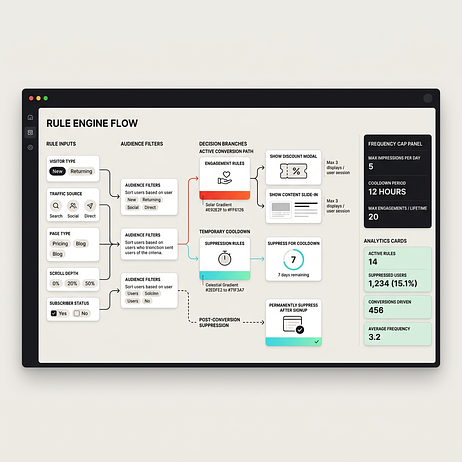
Showing the same pop-up to a first-time visitor and a returning subscriber wastes impressions and annoys loyal customers. Suppression and targeting rules separate a pop-up program that scales from one that degrades the user experience.
Build a rule library for your campaigns:
- New vs. returning: Suppress pop-ups for users who already subscribe by checking their cookie or unified customer profile in Insider One’s Native CDP
- Source-based: Show different offers to paid traffic versus organic traffic
- Category targeting: Show category-specific offers on product pages and adjust offers by region
A sample rule looks like this: if the visitor is new, the source is paid, the page is a product page, and scroll depth exceeds a meaningful threshold, show a discount modal. Suppress this modal for a cooldown period after display.
If you’re ready to move from one-off rules to always-on targeting and suppression across channels, book a demo and we’ll map your pop-up logic to the behaviors that actually predict conversion.
Progressive profiling extends personalization further: instead of asking visitors for five fields at once, Insider One’s Native CDP collects one data point per visit, building a complete customer profile across multiple touchpoints without friction. Over five interactions, you learn name, company, role, content preference, and buying stage without ever displaying a form that depresses conversion rates.
How do you cap frequency and suppress after conversion?
Showing a pop-up to someone who just subscribed creates a poor experience that reduces engagement with all your future messaging. Showing the same pop-up repeatedly in one session damages your brand perception.
Implement these default frequency rules:
- Session limit: Enforce a strict per-session pop-up limit
- Cooldown period: Wait a cooldown period before showing a pop-up to a user who dismissed it
- Post-conversion: Permanently hide lead capture forms for users who subscribe
If you run multiple pop-up types like newsletter captures and cart abandonment alerts, give each its own frequency cap. The total pop-ups per session should still remain capped at one.
How do you design mobile-first to avoid search engine optimization (SEO) penalties?
Google penalizes interstitials on mobile devices that cover the main content immediately after a user arrives from search. This is a ranking factor, not just a user experience preference. intrusive interstitials on mobile devices
Compliant alternatives for mobile traffic:
- Sticky bar: Remains persistent but does not block the main content
- Slide-in: Appears in the corner and does not require dismissal to continue reading
- Delayed modal: Appears only after significant engagement like scroll depth, never on page load
Mobile tap targets must be large enough, and the close button must be easily tappable. The modal should not cover most of the viewport on initial display. Google does not penalize pop-ups that are legally required, such as age verification or cookie consent forms.
If you want to see what “mobile-safe” pop-ups look like in practice, browse the product demo hub for real examples you can use and adapt.
What should you test before design changes?
Teams often spend weeks testing button colors and headline variations when the offer type and trigger timing drive far more impact. Design polish matters, but only after you validate the fundamentals.
Follow this test prioritization ladder:
- Offer type: Test discounts against content or early access
- Trigger type: Test exit intent against scroll depth or time delays
- Targeting rules: Test new visitor segments against returning visitors
- Copy and design: Test headlines, calls to action, and imagery last
Most pop-up tests need a lot of impressions to reach statistical significance. If your traffic is low, focus entirely on high-impact variables like the offer and trigger rather than splitting traffic across cosmetic tests.
How do you measure email pop-up performance beyond sign-up rate?
Teams often optimize for sign-up rate, declare victory, and then discover those sign-ups have terrible downstream conversion. Sign-up rate is a leading indicator, not a success metric.
Use this measurement framework to track true performance:
- Sign-up rate: Use this as your baseline metric
- List quality indicators: Track engagement rates, unsubscribe rates, and complaint rates soon after signup
- Revenue attribution: Compare the revenue per subscriber acquired via pop-up against other acquisition sources
- Incrementality: Use holdout groups to measure whether pop-up sign-ups convert at a higher rate than the baseline
Last-touch attribution over-credits pop-ups because they capture users who are already engaged. Source tagging and holdout groups are necessary to measure true incremental value.
If you want to measure pop-ups on revenue, not vanity sign-ups, book a demo and we’ll show you how to connect on-site capture to downstream conversion and incrementality.
What do email pop-up examples show in practice?
Most example roundups show screenshots without explaining the rationale behind the design. We score these examples against the best practices covered above to show exactly what works and why.
Exit-intent discount modal
This format triggers only when the cursor leaves the viewport. It offers a clear discount with a single email field. The form asks for a first name, which adds unnecessary friction. High clarity, strong offer fit, moderate friction.
Mobile sticky bar
This format complies with Google mobile guidelines by taking up only a small portion of the screen. The call-to-action button is too small for standard tap targets. High compliance, low friction, poor accessibility.
Gamified prize wheel
This format drives extremely high engagement rates from new visitors. It often attracts low-intent users who unsubscribe immediately after getting the discount code. High friction, poor timing fit, high initial conversion.
Content upgrade slide-in
This format triggers after meaningful scroll depth on a blog post, offering a downloadable guide related to the article topic. The headline focuses on the newsletter rather than the specific guide. Excellent timing fit, strong offer fit, moderate clarity.
Before and after rewrite
Before: A fullscreen modal triggers immediately on page load asking users to “Join our mailing list” with a “Submit” button.
After: A delayed modal triggers after the visitor has spent some time on the page, offering “Get early access to our fall collection” with an “Unlock early access” button.
Industry-specific examples beyond e-commerce:
- Travel booking recovery: A travel platform triggered a slide-in after visitors viewed three destination pages without booking, offering email alerts for price drops. Suppression logic excluded users who already had an active booking in their Native CDP profile.
- Financial services lead generation: A wealth management firm used a delayed content-gate modal on long-form articles, triggered after meaningful scroll depth, offering a downloadable investment guide in exchange for a business email. Form fields were limited to email and company size.
- Media content gating: A digital publisher triggered a metered paywall pop-up after three article views in a session, offering a free trial. The Native CDP tracked consumption across sessions so the gate appeared at the right moment, not on every page load.
If you want a faster way to pressure-test these patterns against your own site and traffic mix, the product demo hub is a good place to start.
How does Insider One help you build high-converting email pop-ups?
Building pop-ups that convert without annoying visitors requires real-time behavioral targeting, frequency management, and cross-channel suppression. Most teams stitch this together across multiple tools. Insider One consolidates it into a single platform.
Here is how our capabilities map to pop-up best practices:
- Behavioral triggers: Architect, Insider One’s customer journey orchestration solution, enables scroll-depth, exit-intent, and event-based triggers without developer involvement
- Segmentation and suppression: Insider One’s Native CDP ensures pop-ups are suppressed for existing subscribers and personalized by visitor status, source, and behavior
- A/B testing with auto-optimization: Sirius AI™, Insider One’s extensive set of artificial intelligence (AI) capabilities, includes A/B Auto-Winner Selection to automatically shift traffic to winning variants based on conversion or revenue. Sirius AI™ also powers Predictive Segmentation; identifying visitors with a high likelihood to purchase or churn, so pop-ups reach the right person with the right offer before intent fades
- Cross-channel coordination: Pop-up sign-ups flow directly into email, SMS, WhatsApp, and push journeys without manual list exports. When a visitor closes a pop-up without converting, Architect automatically triggers a personalized push notification two hours later, continuing the conversation across channels without requiring the user to revisit the page
- Real-world use case: A global footwear brand used Insider One to trigger localized pop-ups based on regional inventory data from the Native CDP. When a visitor viewed a sold-out product, an exit-intent pop-up captured their email for restock alerts. The sign-up automatically launched an Architect journey that delivered personalized WhatsApp notifications when the product returned to stock, turning a high-bounce page into a loyalty touchpoint without any manual intervention
If you’re done guessing and ready to build pop-ups that hit your list-growth goals without the fatigue tax, book a demo to see Insider One in action.
Insider One vs. traditional point solutions
Enterprise pop-up programs require more than a widget. The table below shows how Insider One’s unified platform compares to assembling the same capabilities from multiple point-solutions.
| Capability | Insider One | Traditional Point Solutions |
| Behavioral triggers | Real-time, event-based via Architect (scroll, exit, cart events) | Page-load based; often delayed or session-level only |
| Visitor segmentation | AI-powered predictive segments from Native CDP (purchase intent, churn likelihood, VIP tier) | Cookie-based, session-level attributes only |
| A/B testing | Auto-winner selection via Sirius AI™; traffic shifts automatically to the best variant | Manual monitoring and winner selection required |
| Cross-channel follow-up | Automatic journeys via Architect (Email, SMS, WhatsApp, Push) | Email only or requires separate tools and manual list exports |
| Suppression logic | Real-time across all channels; unified subscriber status from Native CDP | Single-channel; often manual or delayed sync |
| Progressive profiling | Built-in via Native CDP; one field per session over multiple visits | Not available; full form required upfront |
Frequently asked questions
Trigger after meaningful scroll depth or after they’ve spent some time on the page. This ensures the visitor has engaged with the content before you ask for their email address.
Check for a subscription cookie or query your unified customer profile before displaying the pop-up. Permanently hide lead capture forms for users who have already converted.
A modal centers on the screen and dims the background, requiring dismissal to continue. A slide-in appears in the corner without blocking the main content and does not require dismissal.
Gamified pop-ups drive high initial engagement but often attract low-intent users who unsubscribe quickly. Test carefully and measure downstream engagement, not just sign-up rate.
Use delayed modals that trigger after scroll depth, slide-ins that appear in the corner, or sticky bars that take up only a small portion of the screen. Never show a fullscreen modal immediately on page load from search.
Progressive profiling collects one form field per visit instead of requesting all information at once. Insider One’s Native CDP tracks what has already been collected, so each new visit reveals one additional data point—name, role, company size, or buying intent, without increasing friction. Over time you build a complete subscriber profile that enables deeper personalization across email, SMS, and WhatsApp.
Sirius AI™ goes beyond selecting a winning variant. Its Predictive Segmentation identifies visitors with a high likelihood to purchase or churn before they act, so pop-ups deliver the right incentive at the right moment without waiting for a behavioral trigger. Auto-Winner Selection automatically shifts traffic to the highest-converting variant, eliminating the manual monitoring that traditional A/B testing requires.
Yes. Travel brands use behavioral pop-ups for booking recovery and price-drop alerts. Financial services firms use content-gate modals to generate qualified leads. Media and publishing brands use metered gating triggered by article view depth to grow subscription lists. The trigger logic and suppression rules are the same across industries; only the offer and targeting criteria change.

Keep Reading
7 min.

Muharrem Derinkok
4 Jun 2026
11 min.

Chris Baldwin
2 Jun 2026
4 min.
Chris Baldwin
3 Feb 2026