

 Platform Overview

 Integration Hub

 Agent One™

 Agent One Teams™

 Customer Data Management

 Personalization

 Journey Orchestration

 Reporting & Data

 Behavioral Analytics

 Web
Web

 Email
Email

 Site Search

 Conversational CX

 WhatsApp

 Web Push

 InStory

 App
App

 SMS & RCS

 Join the $0 Migration Movement™

 The Insider One Difference

 Compare Vendors

 Switch to Insider One

 Success Story

 Retail & Ecommerce

 Financial Services

 Travel & Hospitality

 Beauty & Cosmetics

 Automotive

 Telecommunications

 Total Economic Impact™ Study

 Blog
Blog

 E-Books & Guides

 Glossary
Marketing Automation Platforms That Support Every Stage of the Customer Lifecycle

Updated on 19 Jun 2026
9 min.
Table of Contents
- Summary
- What are the best marketing automation platforms for the full customer lifecycle?
- Which marketing automation platforms support the customer lifecycle?
- What is customer lifecycle automation in marketing?
- What should you evaluate in a lifecycle-ready marketing automation platform?
- How do you select and roll out a lifecycle marketing automation platform?
- Why does Insider One support the full customer lifecycle?
- Frequently asked questions
Most Popular
Summary
Marketing automation should guide customers through their lifecycle using real-time behavior and transaction data, not static lists. The right platform combines unified customer profiles, CRM syncing, event-based triggers, cross-channel messaging, and smart suppression. Without governance, automation can scale bad decisions as quickly as good ones.
Marketing automation platforms that support the customer lifecycle don’t just send emails on a schedule. They recognize where each customer sits in their journey. They trigger the right message at the right moment across the right channel and suppress follow-ups the instant behavior changes.
Many teams evaluate lifecycle support based on unified profiles, real-time triggers, cross-channel orchestration, and stage-aware suppression in one place.
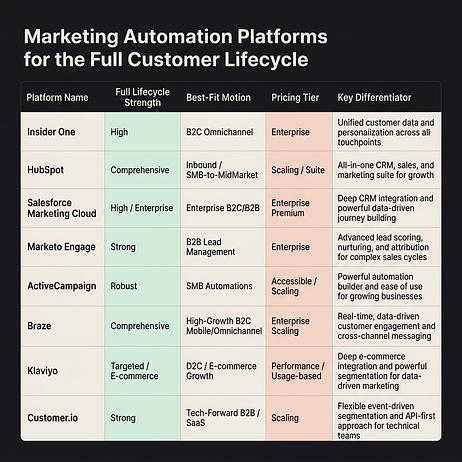
What are the best marketing automation platforms for the full customer lifecycle?
Teams evaluating platforms often compare feature lists without mapping capabilities to lifecycle stages. This leads to gaps in onboarding or retention coverage down the line.
| Platform | Primary lifecycle strength | Best-fit motion | Starting price | Key differentiator |
| Insider One | Full lifecycle orchestration | Hybrid | Contact for pricing | Native customer data platform (CDP) + artificial intelligence (AI)-powered journey orchestration |
| HubSpot | Lead nurturing to close | Sales-led | Free tier available | Customer relationship management (CRM)-native lifecycle stage governance |
| Salesforce Marketing Cloud | Enterprise omnichannel | Sales-led | Contact for pricing | Journey Builder + deep CRM integration |
| ActiveCampaign | SMB lifecycle automation | Hybrid | Paid plans available | Accessible automation with engagement scoring |
| Braze | Mobile-first retention | PLG | Contact for pricing | Canvas for multi-channel retention journeys |
| Klaviyo | Ecommerce lifecycle | PLG | Free tier available | Predictive CLV + ecommerce-native flows |
Detailed reviews of how each platform handles lifecycle orchestration follow below.
Which marketing automation platforms support the customer lifecycle?
A cart abandonment email fires, something Baymard Institute’s research shows is triggered frequently given average abandonment rates, but the customer already converted via app push shortly earlier. This happens when platforms lack cross-channel suppression or real-time profile updates. The reviews below focus on how each platform handles lifecycle-specific orchestration rather than feature checklists.
Insider One
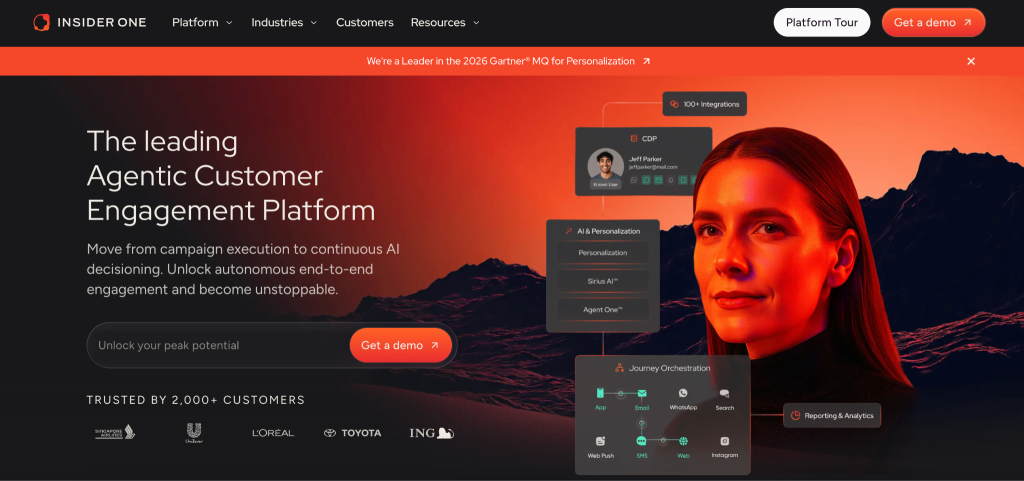
Architect, Insider One’s customer journey orchestration solution, enables lifecycle automation across web, app, email, SMS, WhatsApp, and paid channels from a single canvas. The native customer data platform (CDP) eliminates identity fragmentation that causes duplicate messages or missed suppression. Sirius AI™, Insider One’s extensive set of AI capabilities, powers next-best-channel selection and send-time optimization without requiring data science resources.
Here’s a concrete workflow example: a user completes their first purchase and enters the new customer segment. Architect triggers an email immediately, a push notification soon after if the app is installed, and a WhatsApp message later if there’s no app engagement. The journey suppresses further messages immediately if a second purchase occurs.
Teams can launch quickly when their data sources and channels are already connected. Insider One offers predictable MTU-based pricing with no hidden charges for data, storage, or duplicated events. Schedule a demo to see what real-time suppression and cross-channel journeys look like on a single canvas.
Main features:
- Native CDP with real-time identity resolution: Unified profiles across web, app, and offline channels prevent duplicate sends
- Architect journey canvas: Visual builder with branching logic, wait-until conditions, and cross-channel suppression
- Sirius AI™ automation: Next-best-channel selection, send-time optimization, and A/B auto-winner selection
- Extensive segmentation attributes: Behavioral, transactional, and predictive segments update in real time
Ideal for: Mid-market and enterprise teams managing omnichannel lifecycle campaigns without dedicated data engineering resources.
Pricing: MTU-based pricing with no hidden charges. Contact for pricing based on volume and channel requirements.
HubSpot
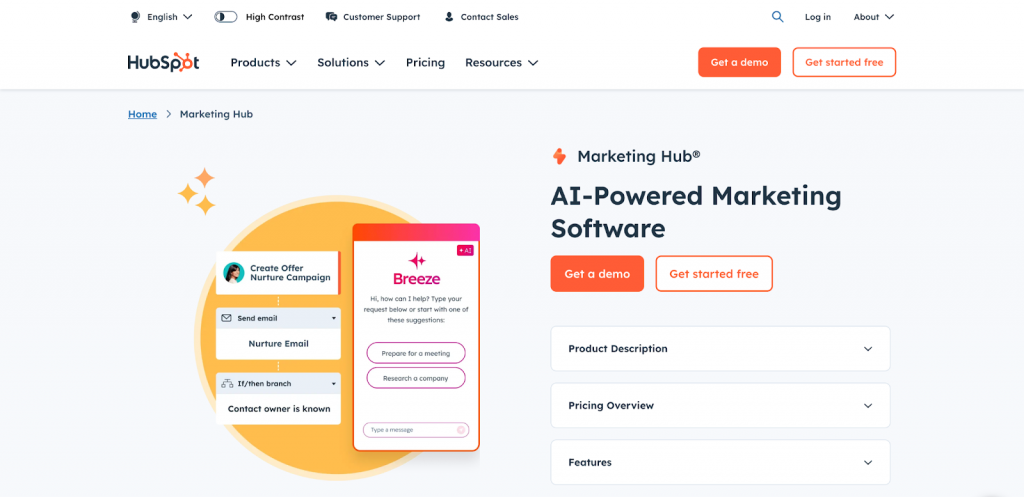
HubSpot treats lifecycle stage as a native CRM property. Marketing and sales share a single source of truth for where each contact sits, and workflows trigger based on lifecycle stage transitions rather than just form fills.
Example workflow: the trigger fires when a lifecycle stage changes to “Sales Qualified Lead” based on an engagement score above a set threshold. The channel action sends an internal notification to the sales rep and pauses the automated email sequence.
Best fit for teams already invested in HubSpot CRM who need tight alignment between marketing automation and sales pipeline visibility. Teams should confirm whether their HubSpot setup covers WhatsApp, push, and in-app orchestration or needs additional tools.
Pricing: Free tier available with limited automation. Paid plans are available across tiers.
Salesforce Marketing Cloud
Teams should check whether Contact Key mappings between Marketing Cloud and Sales Cloud are configured correctly to avoid duplicate profiles and broken journey suppression. Journey Builder handles complex branching but requires careful data extension architecture.
Example workflow: an opportunity stage changes to “Closed Won” in Sales Cloud. The segment includes new customers in the enterprise tier. Channels deliver an onboarding email series and an in-app message, suppressing further messages if a support ticket opens early in the onboarding period.
Best fit for enterprises already standardized on Salesforce CRM with dedicated Marketing Cloud administrators.
Pricing: Contact Salesforce for pricing. Pricing varies by edition and add-on channels.
Pricing: Contact Adobe for pricing. Typically annual contracts based on database size.
ActiveCampaign
ActiveCampaign provides visual and approachable automations. Site tracking and event tracking work without developer involvement, and engagement scoring helps identify at-risk customers for reactivation campaigns.
Example workflow: a contact ignores emails for an extended period. The segment includes previously engaged customers with purchase history. The channel delivers a re-engagement email series with progressive discounting.
Best fit for SMBs and mid-market teams prioritizing ease of use over channel breadth. Teams should verify whether their ActiveCampaign setup covers WhatsApp, push, or in-app messaging natively or through additional tools.
Pricing: Multiple plans are available; pricing varies by tier.
Braze

Braze features a Canvas that supports complex multi-step journeys with branching, experiments, and frequency capping designed for mobile-first engagement. In-app messaging and push notifications are native.
Example workflow: a user completes the onboarding flow in the app. The segment targets new users who haven’t made their first purchase. Channels deliver an in-app message soon after, a push notification later, and an email after that.
Teams evaluating Braze should confirm how identity resolution is handled within their existing data infrastructure.
Pricing: Contact Braze for pricing. Typically annual contracts based on monthly active users.
Klaviyo
Klaviyo provides pre-built flows for ecommerce lifecycle stages: welcome, browse abandonment, cart abandonment, post-purchase, win-back, and replenishment. Predictive analytics surface churn risk and customer lifetime value without data science resources.
Example workflow: a predicted churn risk score exceeds a threshold. The segment includes customers with multiple previous purchases. Channels send an email with personalized product recommendations and an SMS with a limited-time offer.
Best fit for direct-to-consumer and ecommerce brands on Shopify, BigCommerce, or WooCommerce.
Pricing: Free tier available with contact limits. Email and Email and SMS plans are available.
What is customer lifecycle automation in marketing?
Lifecycle automation executes stage-specific actions based on real-time behavioral signals. Journey maps visualize touchpoints. Lifecycle automation acts on them.
| Stage | Goal | Example triggers | Primary KPI |
| Acquisition | Convert anonymous to known | Form fill, account creation, app download | Lead capture rate |
| Activation | Drive first value moment | First purchase, first login, onboarding completion | Activation rate |
| Retention | Sustain engagement | Repeat purchase, feature adoption, content consumption | Retention rate |
| Expansion | Increase customer value | Upsell, cross-sell, referral | ARPU |
| Win-back | Re-engage lapsed customers | Inactivity threshold, churn prediction score | Reactivation rate |
Three capabilities must work together for lifecycle automation to succeed: unified customer profiles to know which stage someone occupies, event-based triggers to act on behavioral signals, and cross-channel orchestration to reach customers where they engage. Schedule a demo to map your real lifecycle stages to the exact triggers and suppressions you’ll need in production.
What should you evaluate in a lifecycle-ready marketing automation platform?
A platform with strong email automation but weak mobile channels creates lifecycle gaps for brands where app engagement drives retention.
Data foundation:
- Does the platform support real-time identity resolution across web, app, and offline?
- Can you define protected fields to prevent CRM overwrites?
- What’s the sync latency between CRM and marketing platform?
Journey orchestration:
- Can journeys branch based on real-time behavioral signals?
- Does the platform support cross-channel suppression within a single journey?
- Are frequency caps configurable at global and campaign levels?
AI and optimization:
- Does send-time optimization require minimum data volume thresholds?
- Can A/B tests auto-select winners based on conversion rather than just opens?
If you want a fast way to evaluate vendors against these requirements, head to the product demo hub and compare how lifecycle-critical capabilities work in the real UI, not just on slides.
How do you select and roll out a lifecycle marketing automation platform?
Teams select platforms based on demos, then discover during implementation that their data architecture doesn’t support the workflows they planned.
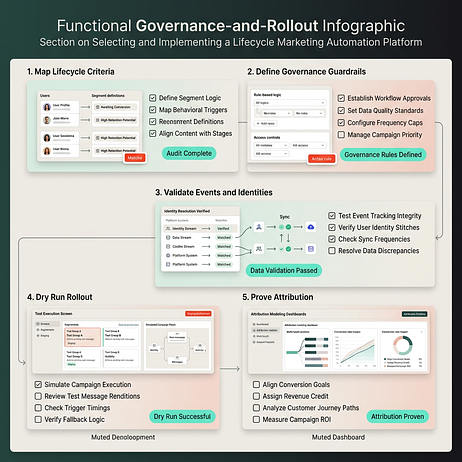
Step 1: Map lifecycle stages and entry/exit criteria.
Teams import contacts into a new platform without defining what “customer” versus “lead” means. They build journeys that fire for the wrong audiences.
| Stage | Entry criteria | Exit criteria |
| Lead | Form fill or account creation | Converts to customer or marked disqualified |
| New customer | First purchase or subscription start | After an initial period post-first purchase |
| Active customer | Recent engagement | No engagement for an extended period |
| At-risk | No engagement for an extended period | Re-engages or churns |
| Churned | No engagement for a long period and no active subscription | Re-engages |
Step 2: Define governance and guardrails.
A reactivation campaign fires to churned customers, but the suppression list wasn’t updated. Active customers receive “we miss you” messages.
- Frequency caps: Define maximum messages per channel per week
- Quiet hours: Set send windows that respect time zones
- Suppression lists: Maintain global suppression for unsubscribes and active support tickets
- Approval workflows: Require sign-off for campaigns exceeding volume thresholds
Step 3: Validate events, identities, and sync.
A cart abandonment journey fires late because event sync latency exceeds the wait step duration. Customers receive reminders after they’ve already converted.
| Test | Pass criteria |
| Event latency | Events appear in platform within a short window |
| Identity stitching | Anonymous-to-known conversion merges profiles without duplication |
| CRM sync | Lifecycle stage changes reflect within a short window |
Step 4: Dry run and progressive rollout.
A welcome journey goes live to the full database, but a logic error causes infinite loop sends.
- Canary cohort: Test with internal team and small external segment
- Limited rollout: Expand to broader segment, monitor for errors
- Full rollout: Deploy after validation period
Step 5: Prove attribution and ROI.
Last-touch attribution credits the final message before conversion, but lifecycle automation influences behavior across multiple touchpoints.
| Model | Best for | Limitation |
| Last-touch | Simple reporting | Ignores upstream influence |
| Linear | Equal credit distribution | Doesn’t reflect actual impact |
| Holdout test | Incremental impact measurement | Requires statistical rigor |
If you’re serious about avoiding stage drift and “automation at scale” mistakes, schedule a demo and we’ll walk through a rollout plan built around your data, your channels, and your governance needs.
Why does Insider One support the full customer lifecycle?
Lifecycle-ready automation requires unified profiles, event-based triggers, cross-channel orchestration, governance guardrails, and measurement capabilities. Insider One delivers all five in a single platform.
- Native CDP with real-time identity resolution: No upstream data infrastructure required
- Architect journey orchestration: Cross-channel suppression and frequency capping built in
- Sirius AI™ automation: Next-best-channel and send-time optimization without data science resources
- Predictable MTU pricing: No hidden charges for data, storage, or duplicated events
If you want to see how these pieces work together end-to-end (not as separate tools), open the product demo hub and preview the journeys, profiles, and suppression controls teams use to run lifecycle from acquisition through win-back.
Frequently asked questions
Define protected fields in both systems and establish which system is the source of truth for each field. Configure sync rules to respect field ownership.
Route events through a CDP or data warehouse for enrichment and deduplication before syncing to the marketing platform. Define latency service level agreements for time-sensitive triggers.
Use multi-touch attribution models for directional insight across the entire journey. Run holdout tests for incremental impact measurement on high-stakes campaigns.
Configure global frequency caps and maintain updated suppression lists. Require approval workflows for high-volume sends and run canary tests before full rollouts.

Keep Reading
7 min.

Muharrem Derinkok
4 Jun 2026
11 min.

Chris Baldwin
2 Jun 2026
4 min.
Chris Baldwin
3 Feb 2026