

 Platform Overview

 Integration Hub

 Agent One™

 Agent One™ Teams

 Customer Data Management

 Personalization

 Journey Orchestration

 Reporting & Data

 Behavioral Analytics

 Web
Web

 Email
Email

 Site Search

 Conversational CX

 WhatsApp

 Web Push

 InStory

 App
App

 SMS & RCS

 Join the $0 Migration Movement™

 The Insider One Difference

 Compare Vendors

 Switch to Insider One

 Success Story

 Retail & Ecommerce

 Financial Services

 Travel & Hospitality

 Beauty & Cosmetics

 Automotive

 Telecommunications

 Total Economic Impact™ Study

 Blog
Blog

 E-Books & Guides

 Events

 Glossary
Architect: ‘Call an Agent’ element

Updated on 9 Jul 2026
10 min.
Table of Contents
- Architect's Call an Agent: Native AI Reasoning for Every Customer Journey
- Built for marketing teams, not engineering teams
- What you can do with Call an Agent today
- Top use cases by vertical
- Getting started quickly with Agent Templates
- Predictable costs, no engineering surprises
- How this compares to other platforms
- Who benefits most
- Available now for Architect partners
- Frequently asked questions
- What is Call an Agent in Insider One's Architect?
- Do I need engineering or technical resources to use Call an Agent?
- What can the AI output be used for?
- What output types does Call an Agent support?
- Is Call an Agent a product recommendation engine?
- How does pricing work?
- What happens if my credit limit runs out mid-journey?
- Can I test a Call an Agent configuration before going live?
- Are there pre-built templates available?
- Which channels does Call an Agent work with?
- Who is Call an Agent available to?
Most Popular
Architect’s Call an Agent: Native AI Reasoning for Every Customer Journey
Until now, customer journey orchestration has been fundamentally rule-based. Marketers define conditions, set up branches, and build logic trees. When the conditions are met, the journey moves. When they’re not, it waits.
That model works, until it doesn’t. Static rules are blunt instruments. They can’t evaluate nuanced context, generate personalised copy on the spot, or make a judgment call about a customer that no fixed condition could capture. As customer expectations rise and the volume of relevant signals grows, the gap between what rule-based journeys can deliver and what customers actually experience keeps widening.
Call an Agent closes that gap.
What Call an Agent does
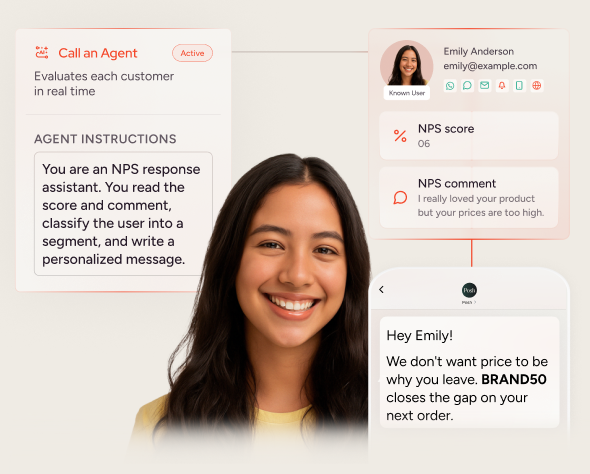
Call an Agent is a new element inside Architect, Insider One’s customer journey orchestration solution. It lets marketing teams embed AI reasoning directly into a journey, without writing code, without opening an engineering ticket, and without connecting any external AI tools.
Here’s how it works: the marketer writes a plain-language instruction describing what the AI should evaluate. For example: “Classify this customer’s sentiment based on their most recent support interaction.” They then define what kind of answer they need back – a label, a score, a yes/no, a list, or a value from a predefined set. When a customer reaches that step in a live journey, the AI evaluates that specific person’s context and returns a structured result. That result immediately flows into the rest of the journey.
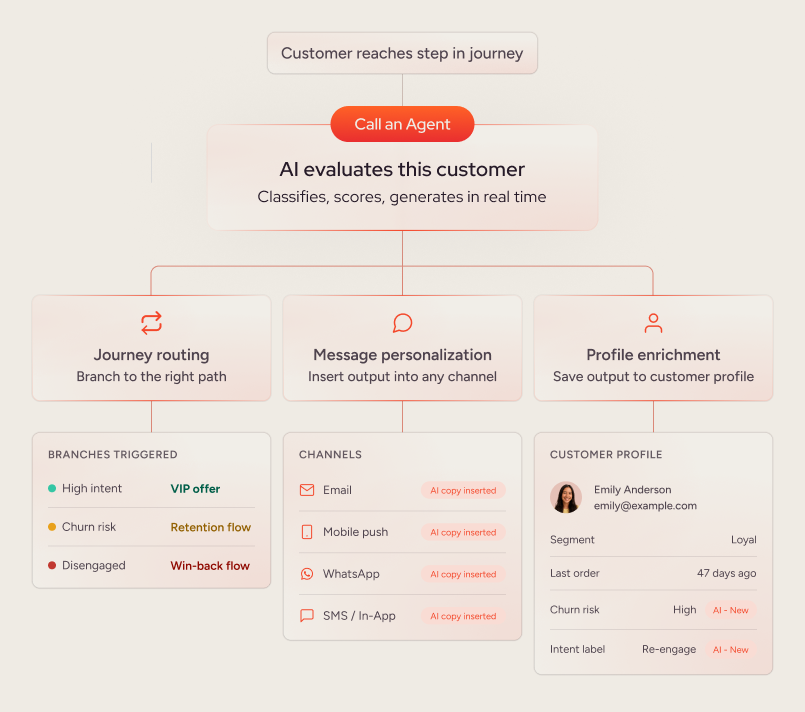
One AI step. Three ways to act on the output.
Route the journey
Use the AI’s output to branch customers toward the most relevant path, automatically. High-intent customers go one way. Churn-risk customers go another. Customers who expressed frustration in their last support interaction get a recovery flow instead of a promotion. No rule tree required.
Personalize the message
The AI’s output is inserted automatically into the next message the customer receives next, across Email, SMS, Web Push, App Push, WhatsApp, In-App, and other channels, creating a message tailored to their individual context in real time.
Enrich the customer profile
Save the AI output back to the customer profile as a reusable attribute. Once it’s there, every other journey, segment, and campaign in the system can act on it.
Built for marketing teams, not engineering teams
Today, adding AI reasoning to a customer journey typically requires engineering to build and maintain a separate enrichment layer before the journey orchestration tool even sees it. That’s expensive, slow to change, and inaccessible to the teams who know the customers best.
With Call an Agent, the process is different:
• Write the instruction in plain language – the same way you’d brief a colleague
• Define the shape of the answer you need
• Test the configuration against a real customer profile before going live
• Ship it
No code. No tickets. No external platforms to manage.
What you can do with Call an Agent today
The use cases available from day one span some of the most common and high-value scenarios in customer engagement:
Intelligent journey routing: Let the AI classify a customer’s intent, risk level, or emotional state, then route them to the right path without a rule tree.
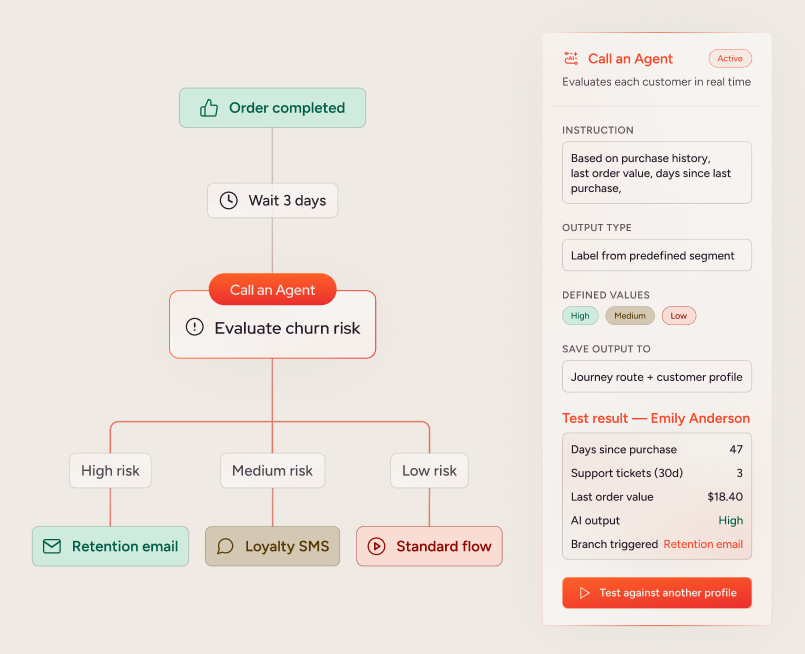
Churn prevention: Have the AI evaluate a customer’s recent behaviour and engagement signals, score their likelihood to churn, and trigger a tailored retention flow for those at risk.
Sentiment-based personalisation: After a support interaction or survey response, use the AI to read the customer’s sentiment and adapt the follow-up journey and message tone accordingly.
AI-generated message copy: Instead of writing one message for all customers in a segment, let the AI write a personalised version for each individual based on who they are and what they’ve done.
Smart summarisation: When a journey pulls in complex external data – booking changes, order updates, billing details – use the AI to turn it into a message the customer actually wants to read.
Replacing complex rule trees: Consolidate dozens of branching conditions into a single AI step that evaluates the full picture and returns a clear, actionable output.
Top use cases by vertical
Ecommerce: churn-risk win-back
A customer returns an item. Call an Agent scores their churn risk as High, Medium, or Low based on return frequency, recency, and email engagement. High-risk customers receive a personalised win-back email; low-risk customers exit the journey with no action taken.
Fintech: sentiment-based follow-up
A customer finishes a support interaction. Call an Agent classifies the sentiment of that interaction as Positive, Neutral, or Negative. Frustrated customers receive an apology and an offer; satisfied customers receive an upsell message.
Telco: best-plan recommendation
A customer’s recent call and data usage is read into the journey. Call an Agent recommends the best-fit plan for that customer and writes a one-sentence reason for the recommendation. That reason is inserted inline into a plan-upgrade message sent to the customer.
Getting started quickly with Agent Templates
Call an Agent includes a library of pre-built Agent Templates for the most common use cases: sentiment classification, churn scoring, intent labelling, summarisation, and generative copy. Teams can select a template and be running their first AI-powered journey step within minutes.
Templates can also be saved and reused across journeys, so teams that invest in defining a strong instruction once can apply it everywhere.
Predictable costs, no engineering surprises
Call an Agent is available as a usage-based credit add-on to all Architect packages. Partners purchase a credit pool, and credits are drawn down as customers move through Call an Agent steps in live journeys.
Two factors drive credit consumption:
Instruction length: Longer, more detailed instructions consume more input tokens and therefore cost more per execution.
Output complexity: A short label or score is inexpensive. A full paragraph of generated copy consumes significantly more. Output tokens are more expensive than input tokens, which means the type of task matters as much as the volume of customers.
To keep spending predictable, teams can set daily and monthly spend caps. If a cap is reached, the step is silently skipped and the journey continues without the AI output, so nothing breaks for the end customer.
How this compares to other platforms
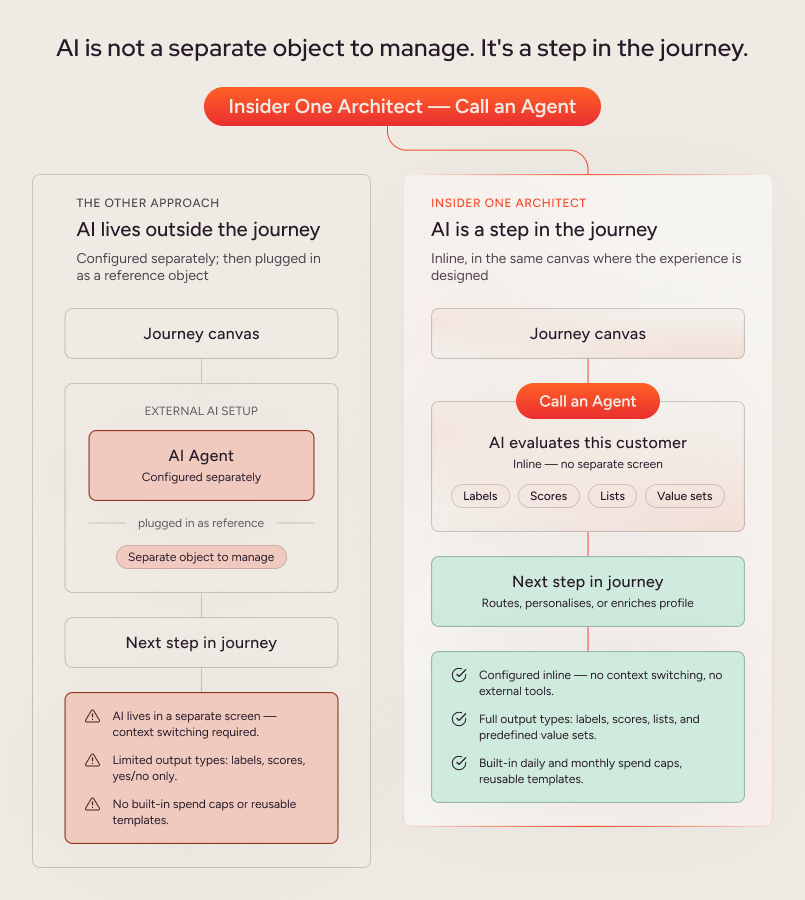
Where Insider One’s approach differs from other platforms is structural. In other platforms, the AI Agent is configured outside the journey, then referenced inside it as a separate object. In Architect, the Call an Agent step lives inline – directly in the canvas where the marketer is already designing the experience. It also supports a broader set of output types, including structured lists and predefined value sets, alongside built-in daily and monthly spend caps and reusable templates.
In Architect, AI is not a separate object to manage. It’s a step in the journey.
Who benefits most
Call an Agent is vertical-agnostic, but the strongest candidates are teams that:
- Already use external data in their journeys and are ready to add an intelligence layer on top of it
- Run complex journeys with many condition branches and want to reduce that complexity without losing precision
- Have large, active user bases where per-customer AI investment delivers returns at scale
- Own journey strategy independently within marketing, without engineering involvement
- Have raised requests for smarter personalisation, more dynamic content, or better journey branching
Relevant sectors include e-commerce and retail, fintech and banking, travel and hospitality, telecommunications, SaaS and subscription, and healthcare and insurance.
Available now for Architect partners
Call an Agent is available to customers today. Teams already using Architect can reach out to their Customer Success Manager to gain access.
If you’re evaluating Insider One and want to see Call an Agent working in a real journey on real data, request a demo.
Frequently asked questions
What is Call an Agent in Insider One’s Architect?
Call an Agent is a native element inside Architect, Insider One’s journey orchestration capability. It lets marketing teams add a real artificial intelligence reasoning step directly into a customer journey — without writing code or involving engineering. The marketer writes a plain-language instruction, defines the type of output they need, and the AI evaluates each customer individually at the moment they reach that step. The result can route the journey, personalise the next message, or be saved back to the customer profile.
Do I need engineering or technical resources to use Call an Agent?
No. Call an Agent is built for marketing teams to configure and operate independently. The instruction is written in plain language — the same way you’d brief a colleague. You define the output type (a label, a score, a yes/no, a list, or a value from a predefined set), test the configuration against a real customer profile before going live, and deploy it from within the Architect canvas. No code, no engineering tickets, no external AI tools required.
What can the AI output be used for?
Each Call an Agent step produces a structured result that can do three things: branch the journey based on what the AI decided, be inserted directly into the message the customer receives next, or be saved back to the customer profile as a reusable attribute. The same output can drive all three simultaneously, depending on how the journey is configured.
What output types does Call an Agent support?
Call an Agent supports labels, scores, yes/no outputs, lists, and predefined value sets. This gives marketing teams flexibility to use AI for classification tasks, scoring, content generation, summarisation, and more — depending on the instruction written.
Is Call an Agent a product recommendation engine?
No. Call an Agent is a general-purpose AI reasoning step. It is not a product recommendation engine — that capability sits within Smart Recommender. Call an Agent is as focused, and as powerful, as the instruction the marketer writes. It can classify, score, generate, summarise, or decide, depending on what the task requires.
How does pricing work?
Call an Agent is available as a usage-based credit add-on to all Architect packages. Teams purchase a credit pool, and credits are drawn down each time a customer moves through a Call an Agent step in a live journey. Credit consumption varies based on instruction length and output complexity — a short classification label costs less than a full paragraph of generated copy. Teams can set daily and monthly spend caps to keep costs predictable. If a cap is reached, the step is skipped silently and the journey continues without the AI output.
What happens if my credit limit runs out mid-journey?
If the credit pool is exhausted, customers who reach a Call an Agent step are passed through to the next element in the journey without the AI being called. No error is shown to the customer. The journey continues, though downstream routing or personalisation that depended on the AI output may be affected. Setting daily spend caps helps prevent unexpected exhaustion before the end of a billing period.
Can I test a Call an Agent configuration before going live?
Yes. Before launching, teams can run any AI configuration against a real customer profile to see exactly what the AI would produce. This test mode mirrors production so there are no surprises at launch.
Are there pre-built templates available?
Yes. Call an Agent includes a library of Agent Templates for common use cases, including sentiment classification, churn scoring, intent labelling, summarisation, and generative copy. Teams can select a template to get started quickly, or save their own templates for reuse across journeys.
Which channels does Call an Agent work with?
Call an Agent works across all seven channels Architect supports: Email, SMS, Web Push, App Push, WhatsApp, In-App, and Call an API. It is available in standard (non-transactional) journeys.
Who is Call an Agent available to?
Call an Agent is rolling out to select Architect partners now, with broader availability to follow. Teams already using Architect can speak with their Customer Success Manager to discuss early access. New to Insider One? Request a demo to see Call an Agent working in a real journey.

Keep Reading
4 min.

Chris Baldwin
3 Feb 2026
8 min.
Chris Baldwin
19 Oct 2026
8 mins.
Chris Baldwin
8 Oct 2026