

 Platform Overview

 Integration Hub

 Sirius AI™

 Customer Data Management

 Personalization

 Journey Orchestration

 Reporting & Data

 Behavioral Analytics

 Web
Web

 Email
Email

 Site Search

 Conversational CX

 WhatsApp

 Web Push

 InStory

 App
App

 SMS & RCS

 Join the $0 Migration Movement™

 The Insider One Difference

 Compare Vendors

 Switch to Insider One

 Success Story

 Retail & Ecommerce

 Financial Services

 Travel & Hospitality

 Beauty & Cosmetics

 Automotive

 Telecommunications

 Interactive Platform Tour

 Blog
Blog

 E-Books & Guides

 Glossary
RCS Interactive Text Messaging

Updated on 5 Mar 2026
9 min.
Table of Contents
- What is RCS (Rich Communication Services)?
- Why enterprise brands are investing in RCS now
- How RCS compares to SMS and MMS
- Components of an RCS message
- Types of RCS messages
- Real-world use cases
- Where RCS fits in Insider One’s platform ecosystem
- What Insider One’s RCS enables
- How to get started with "RCS Messaging"
- FAQs:
Most Popular



Insider One RCS: Transform SMS into Rich, Actionable, and Interactive Experiences
What is RCS (Rich Communication Services)?
RCS (Rich Communication Services) is the next evolution of mobile messaging that upgrades traditional SMS into a richer, more app-like experience inside a customer’s native messaging app. For brands, RCS supports rich media (like high-resolution images and video) and interactive UI elements (like carousels and buttons), which enable more engaging customer experiences than text-only messages.
Why enterprise brands are investing in RCS now
RCS has been around for years, but the context has shifted dramatically. With over 1 billion Android users already sending billions of RCS messages daily and Apple’s iOS 18 support turning it into a true cross-platform standard, rich messaging is evolving from “nice to have” to a “default expectation” for mobile conversations.
A recent study by global tech strategists Juniper Research forecasts that operators will generate $3.1 billion globally from RCS for Business traffic in 2027, up from $1.2 billion in 2025.
Enterprise brands are investing now because RCS combines the universal reach of phone-based messaging with visual, interactive capabilities, like rich cards/carousels, documents, CTAs, quick replies, and branded verification. This is even more critical because it doesn’t need opt-in permission and creates an app-like experience without needing the user to install the app.
This powers higher engagement in critical moments, from ecommerce promotions and cart recoveries to travel service updates and banking alerts.
How RCS compares to SMS and MMS
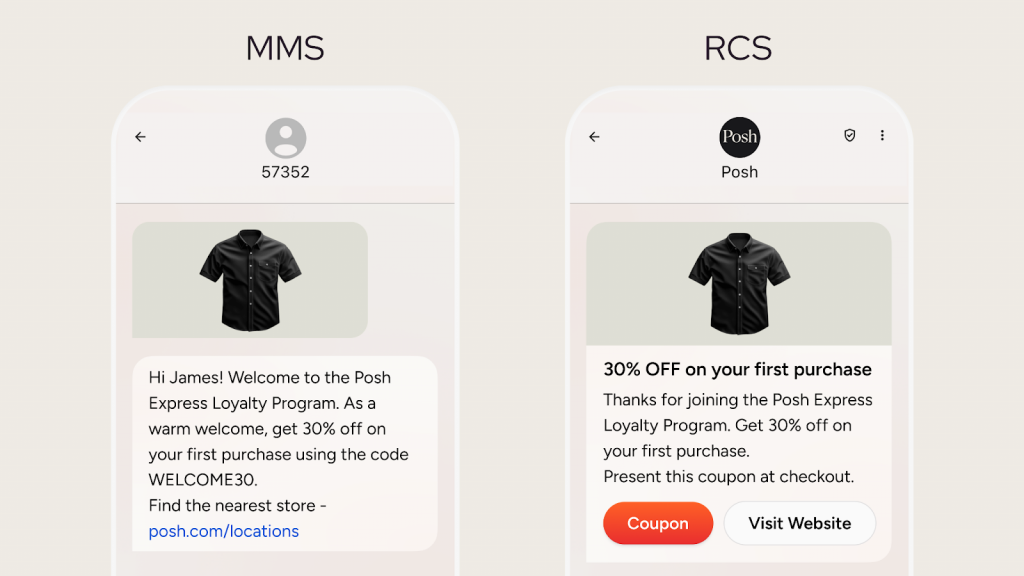
SMS is reliable and universal, but it’s fundamentally constrained: it’s primarily text-based and typically lacks built-in interactivity and native rich content presentation. RCS changes the experience by enabling rich media, buttons, and structured message formats like carousels, so recipients can act directly from the message thread.
If you need maximum reach with basic content, SMS remains the baseline. If you need richer visuals and structured interactivity in the native messaging app experience, RCS is built for that, especially with carousels, suggested actions/replies, and branded/verified sender experiences.
| Capability | MMS | RCS |
| Branding & verification | Sender appears as a phone number | Verified sender name, logo, brand theme & colours |
| Reach & device support | Nearly every phone/carrier worldwide | All modern Android + iPhone (iOS 18) where carrier enabled |
| Character limit | Yes, 1,600 characters | No limit |
| File-size & media quality | Up to ≈ 5 MB; images/video often compressed | Up to ≈ 100 MB; full-resolution media, GIFs, PDFs |
| Interactivity | Static media only (no buttons/carousels) | Buttons, carousels, quick replies, maps, forms |
| Delivery network | Cellular, works without data/Wi-Fi | IP (data or Wi-Fi); auto-fallback recommended |
| Receipts & indicators | Delivery only (sometimes) | Delivery, read, typing indicators |
| Security | No end-to-end encryption | Encryption in transit and end-to-end encryption where supported |
| Analytics | Basic delivery rates | Opens, taps, conversions in real time |
| Use cases | Legacy support & universal reachOne-off visual nudgesLow-bandwidth environments | Deep branding & engagement Rich, interactive campaignsHigh-UX, real-time updatesConversational campaigns |
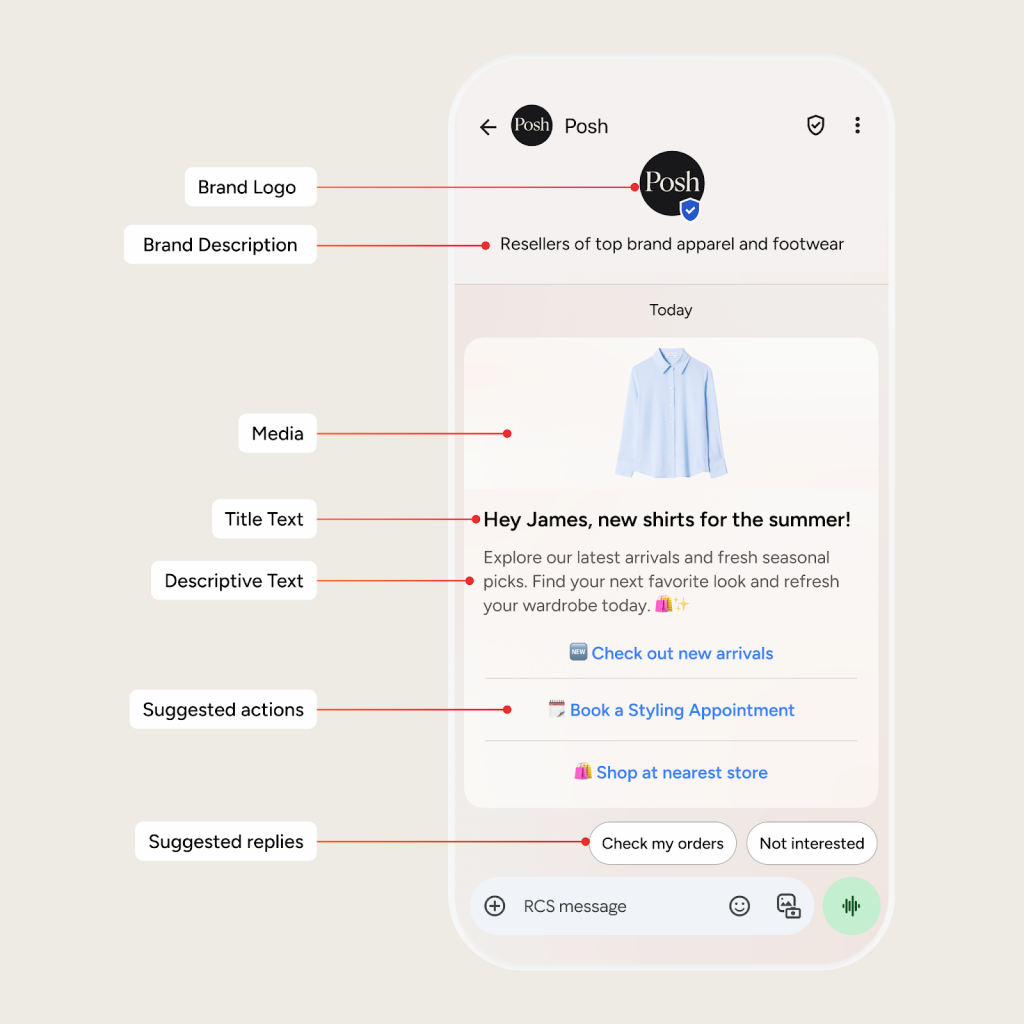
Components of an RCS message
Brand Logo
Displays your company logo prominently in the sender profile or message header, reinforcing visual brand recognition.
Brand Description
A short text field (often in the conversation start card) that describes your business, appearing next to the logo for context.
Verified Sender
A checkmark or badge confirming the message is from an authenticated business, building trust and reducing scam perceptions.
Media – Rich cards
Supports high-res images, videos, GIFs, PDFs, or audio previews directly in the message for engaging, visual storytelling. Carousels (rich card carousels) let you present multiple items, such as products, destinations, or options, in a single message. This is especially useful when a customer needs to compare or choose without bouncing across multiple pages.
Title Text
Bold, prominent header (up to ~200 characters) that grabs attention and summarizes the message’s purpose. Also helps create an app-like experience in the message center.
Descriptive Text
Supporting body copy (up to 2048 chars in rich formats) providing details, context, or instructions below the title.
Suggested Actions
Clickable buttons for one-tap tasks like “View Map,” “Call Now,” “Add to Calendar,” or “Open URL,” streamlining user journeys.
Suggested Replies
Pre-defined quick-response chips (e.g., “Yes,” “No,” “Track Order”) that users tap to reply instantly, guiding conversations.
Types of RCS messages
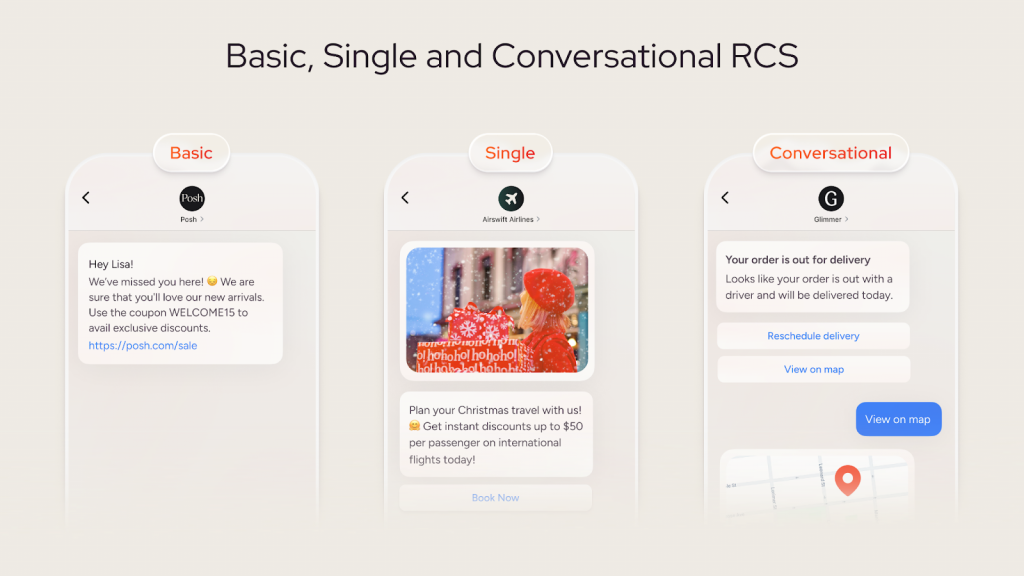
Basic RCS
Basic RCS serves promotional and transactional use cases like OTPs, alerts, limited-time offers, or event announcements. They are limited to 160 characters with text, URL previews, emojis, and special characters; these messages display from a verified sender with delivery/read status. For non-RCS devices, they fallback to SMS automatically. The sender can also see the status of messages sent and whether the message has been delivered or read.
Single RCS
Single RCS is a powerful way for brands to connect with customers by sending multimedia like carousels and rich cards. Effective for prompting quick responses by displaying personalized content like product visuals or special offers. These messages can also help direct users to take specific actions, such as scheduling events, locating stores, calling support, or visiting a website.
Conversational RCS
Conversational RCS enables real-time, two-way dialogue between brands and customers, supporting rich media (images, videos, audio, PDFs, carousels) alongside interactivity like quick replies and branching logic during an active session (typically 24 hours).
It comes in two types: brand-initiated (A2P), where businesses start with a rich message that can escalate to chat upon reply; and user-initiated (P2A), where customers message first for support or inquiries. This format embeds full customer journeys, from marketing and ordering to after-sales, in one thread. It is ideal for use cases like support, guided shopping, surveys, or upsells.
Real-world use cases
RCS is best used where visuals, trust, and immediate action matter, especially for high-intent moments and service journeys.
Ecommerce: recommendation carousel with “View product” CTAs
Use an RCS carousel to showcase multiple recommended items with high-res images, then add a CTA like “View Product” to send users directly to the product page. This format aligns with RCS support for interactive carousels and action buttons.
Travel & hospitality: disruptions resolved inside the message
For flight delays or changes, RCS suggested actions can present clear next steps (e.g., rebook or contact support) without forcing customers to search a help center or stand in line. RCS suggested actions and replies are explicitly designed for these kinds of guided flows.
Banking: trusted, verified communication for high-risk moments
When fraud or suspicious activity occurs, a verified brand profile (logo + verification badge) helps customers quickly recognize legitimate outreach and reduce spoofing risk. Insider One’s RCS supports branded messaging elements like logo and verification badge for this trust-focused use case.
Where RCS fits in Insider One’s platform ecosystem
Insider One’s RCS integrates seamlessly as a new messaging channel right alongside SMS and MMS, empowering teams to expand mobile programs without rebuilding workflows, custom setups, or data pipelines.
Leveraging the drag-and-drop interface customers already love, RCS slots into the familiar SMS flow: select it as the message type during campaign design, preview rich elements in real-time, and test/send with one click. No new integrations or steep learning curves, and setup takes just minutes.
From there, RCS powers full customer journey orchestration: trigger messages based on real-time events (e.g., cart abandonment, flight delays), layer in unified customer data for personalization, build segments across channels, and automate follow-ups blending RCS with email, push, in-app, and web experiences. Analytics flow into the same dashboard for CTR, open rates, and revenue attribution.
This unified approach keeps RCS as a high-engagement lever in omnichannel strategies, scaling effortlessly as brands adopt richer mobile tactics.
What Insider One’s RCS enables
Insider One’s RCS capability supports rich media content, images, videos, carousels, and PDFs, so marketing and customer engagement teams can create richer campaign experiences than SMS alone. It also supports interactive elements, including CTAs and quick responses, enabling recipients to take action or respond directly from the message.
Branded, verified messaging for trust
With Insider One RCS, messages can include a company logo and verification badge to help establish brand identity in the inbox. (Internal source: PM launch brief provided in your request.) Verified sender profiles and badges are widely positioned as trust signals in RCS business messaging, helping recipients recognize legitimate brands.
Open-rate tracking (beyond delivery)
Unlike traditional SMS, RCS can support engagement signals such as opens/read receipts, depending on implementation, enabling better measurement of message performance. Insider One’s RCS capability includes open-rate tracking for RCS messages.
How to get started with “RCS Messaging”
The Insider One RCS channel is now available for existing customers. Once connected, Insider One’s RCS channel can be used as a standalone channel for communication or also be connected to Insider One’s omnichannel journey orchestrator, Architect, as a part of multi-channel journeys for higher engagement.
👉 Check out our interactive platform tour to get a step-by-step walkthrough of how RCS works.
👉 Request a personalized demo of Insider One today to learn more about setup requirements and supported use cases.
Insider One brings everything marketing and customer engagement teams need in one place to reach their peak potential and become unstoppable.
FAQs:
SMS is simple text-only messaging, while RCS enables interactive, app-like messaging experiences within the native messaging app.
RCS enhances messaging by adding rich media, CTAs, quick replies, verified branding, and read receipts, enabling more engaging, trustworthy, and measurable customer interactions than traditional SMS.
RCS messaging offers:
Rich media support – images, videos, GIFs, and carousels
Interactive elements – clickable CTAs and quick replies
Verified branding – ensures messages come from a trusted sender
Read receipts & typing indicators – track engagement in real time
Higher character limits – allows longer, more detailed messages
RCS can revert to SMS when the device is not compatible or for scenarios that do not require rich media or interactive messaging. It can also be manually disabled in the messaging app settings, ensuring messages are sent as standard SMS.
RCS is ideal for businesses seeking interactive, rich-media messaging with CTAs, quick replies, and engagement tracking, while simple text notifications can continue using SMS.
RCS Messaging with Insider One transforms traditional text messages into rich, interactive conversations with images, carousels, and quick-action buttons that guide customers from discovery to purchase in a single chat. Insider One’s RCS also combines with Architect, the omnichannel journey orchestrator, to help deliver personalized experiences across 12+ channels, helping drive more personalized targeting and engagement.
RCS is not fully replacing SMS but complements it. While SMS remains widely supported and effective for simple text notifications, RCS offers richer, interactive messaging with media, CTAs, and engagement tracking. Many businesses use RCS where devices support it, with SMS as a fallback for broader reach.

Keep Reading
4 min.

Chris Baldwin
3 Feb 2026
9 min

Muharrem
23 Dec 2025
10 min.
Muharrem
11 Oct 2024